


Every home job, one app
An on-demand home-services app where a household books cleaning, laundry, AC and ventilation, maintenance and car care - picks a package, schedules a visit, and pays by card or KNET.
Category
- On-demand home services
Product
- Consumer mobile app
Market
- Kuwait
- KWD, KNET & card
What we did
- UX + UI design
- App design system
What is MyHome?
MyHome turns the scattered business of running a household - a plumber this week, a deep clean the next, an AC service before summer - into one app with a single basket, one schedule and one bill.
A whole home's worth of services in one basket
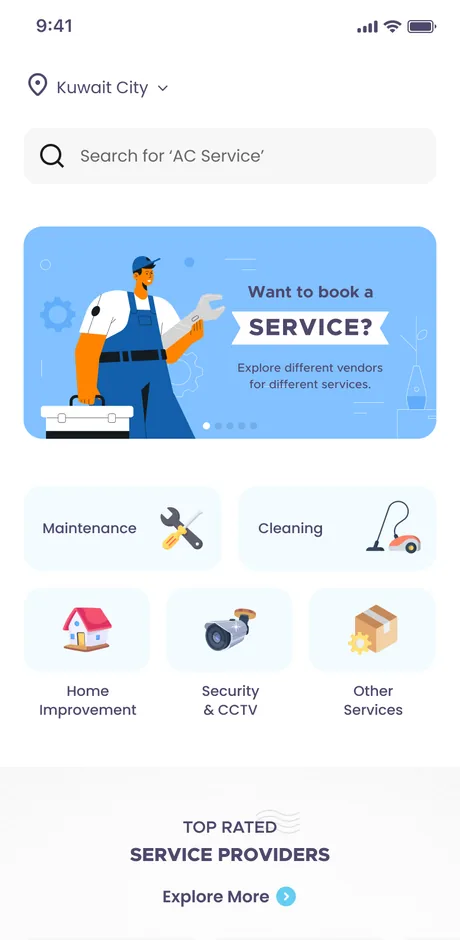
The home screen opens on five service families and the top-rated providers behind them. A household adds work from any of them, keeps it all in one summary, and checks out once instead of chasing five separate trades.
Why is booking home services such a chore?
Getting three different trades to a flat means three phone calls, three quotes and three windows waited in. The app's job is to collapse that into one flow a household actually finishes.
| Booking a home job | The usual way | In MyHome |
|---|---|---|
| Finding a provider | Ask around, hope for the best | Rated providers listed per service |
| Getting a price | Wait for an on-site quote | Fixed package tiers, or a credited assessment |
| Scheduling | Phone tag over a time | Pick a date and an arrival window in-app |
| Recurring cleaning | Re-book every single time | Set weekly or bi-weekly once |
| Paying | Cash on the day | Card or KNET, subscription included |
Service catalogue
5 familiesMaintenance, cleaning, home improvement, security & CCTV and other services, each fanning out into named sub-services with rated providers.
- AC & ventilation
- Cleaning & car wash
- Laundry
Packages & pricing
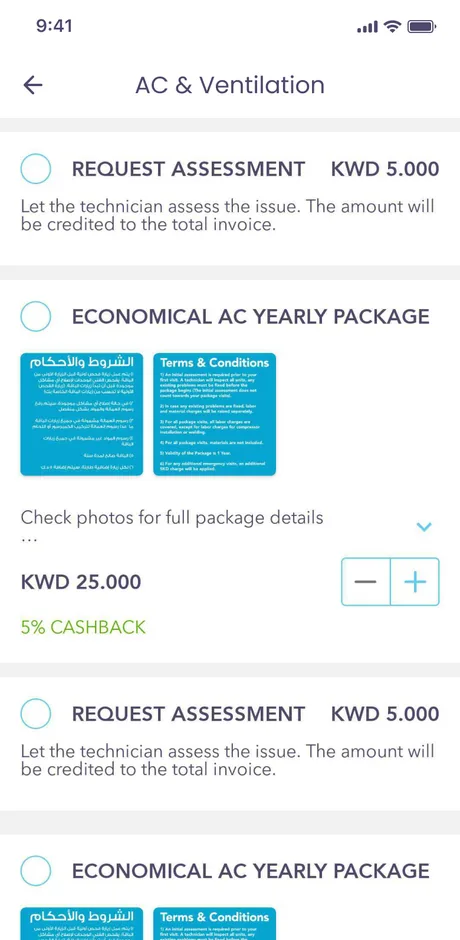
3 tiersEconomical, regular and premium tiers with terms and cashback, quantity steppers, and a paid assessment credited back to the invoice.
- Cashback
- Credited assessment
Scheduling
Slots & recurrenceEvery job booked to a date and arrival window, with weekly and bi-weekly recurrence for cleaning set once.
- Arrival window
- Weekly / bi-weekly
Summary & billing
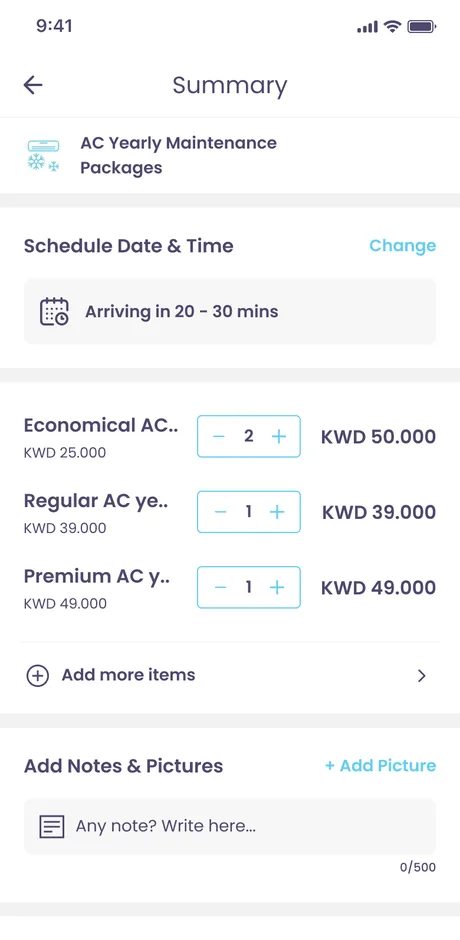
One basketLine items and quantities, order notes and photos, a discount code, a live bill total and address management - one order across every service added.
- Notes & photos
- Coupons
- Addresses
MyHome Plus
MembershipA subscription layering priority service and cashback over the catalogue, offered as monthly or annual plans and billed with the order.
- Priority service
- Monthly / annual
Payments
Card & KNETCheckout by card or KNET, covering one-off orders and recurring subscription payments alike.
- Card & KNET
- Subscription billing
How does a booking come together?
One basket carries a job from the category grid to a paid, scheduled visit. The order is the argument: every decision - service, package, time, extras - is made once and lands in a single summary.
- 01
Browse a family
Open one of the five service families and its sub-services from the home grid.
Customer - 02
Pick the service
Choose the specific job - AC service, a clean, laundry - and read its terms.
Customer - 03
Choose a package
Set a tier and a quantity, or ask for a credited on-site assessment.
Customer - 04
Schedule it
Pick a date and arrival window, or set a weekly / bi-weekly recurrence.
Customer - 05
Review the summary
Add notes and photos, apply a coupon or the membership, and check the running bill.
Customer - 06
Pay & confirm
Add an address and pay by card or KNET, subscription billed alongside.
Customer
Scroll the path sideways
The app, screen by screen
MyHome is a phone product, so every surface is designed for a thumb - the catalogue, a package picker with quantity steppers, the schedule, and a summary that carries notes, photos, a coupon and the membership.
Home
Location, search, a promoted booking banner and the five service families, over a rail of top-rated providers.
Category
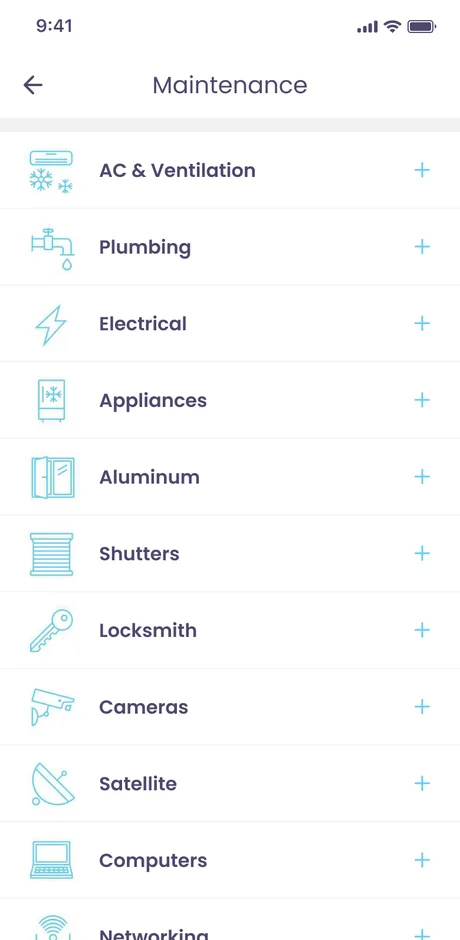
A service family opens onto its sub-services - here AC & ventilation, plumbing and electrical - each with its own imagery.
Package picker
Fixed tiers - economical, regular and premium - each with terms, cashback and a quantity stepper, plus a credited request-assessment option.
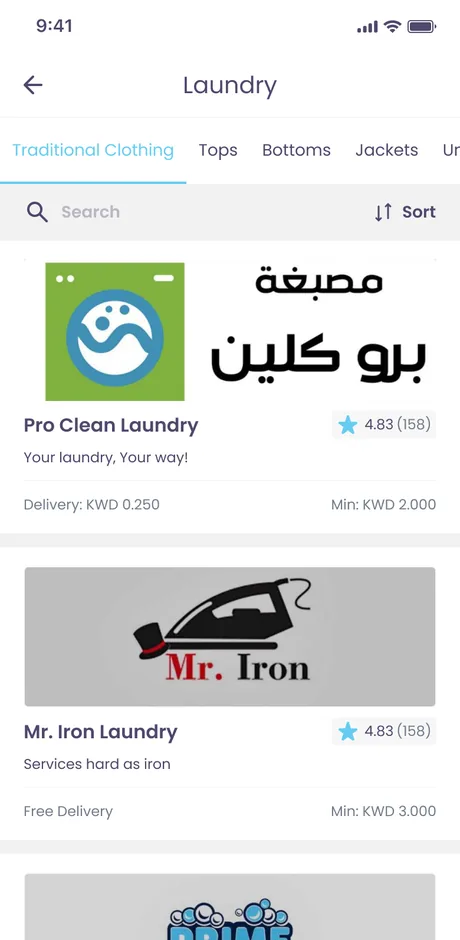
Laundry
Per-unit laundry configuration, priced by the piece and added straight into the same basket.
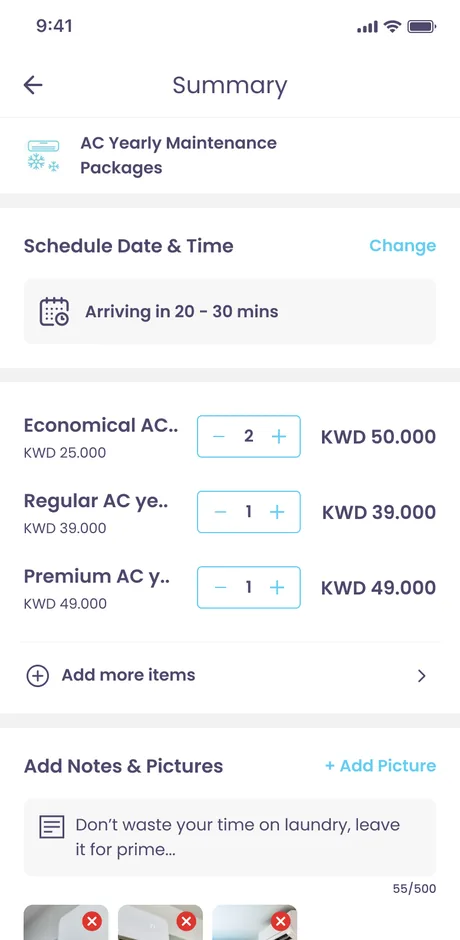
Summary
Schedule, line items with quantities, notes and photos, a discount code and a live bill total before an address is added.
MyHome Plus
The membership applied to an order - priority service, cashback and the plan price folded into the same bill.
What does MyHome look like, and why?
A bright brand cyan carries every primary action - book, add, apply - against a deep marine ink, with a warm yellow reserved for accents and rewards. The result is friendly and legible on a phone in daylight, which is where these bookings actually happen.
Aa
Primary typeface
Poppins
A B C D E F G H I J K L M N O P Q R S T U V W X Y Z
a b c d e f g h i j k l m n o p q r s t u v w x y z
0 1 2 3 4 5 6 7 8 9 & ? ! £ $ €
24pxDisplay headingDisplay20pxSection titleTitle L16pxCard title & body largeTitle M14pxBody & buttonsBody12pxLABELS & CHIPSLabelThe palette and this scale are read from the app's own design-system artboard - a single Poppins family across a fixed 24 / 20 / 16 / 14 / 12 step. Poppins is an open-licence typeface; the specimen falls back to the nearest available face if it is not installed on your device.
Building a home-services booking app
What founders ask us first when they want an app like MyHome.
Ask us yoursHow long does it take to build a home-services booking app?
A first version with a service catalogue, scheduling, a summary and checkout typically takes three to six months, driven mostly by how many service families and payment paths are in scope. MyHome's depth - package tiers, a credited assessment, a subscription and KNET - sits at the upper end, so we phase it: the customer booking flow ships before the provider and admin tools around it.
How much does an app like MyHome cost?
It depends on scope, and no honest number comes from a feature list alone. The biggest cost drivers are the number of service categories, whether recurring bookings and a subscription are in scope, and which local payment rails - KNET, cards - you need. Shanti Infosoft scopes it on a short call and returns a fixed quote.
Can it handle recurring bookings and subscriptions?
Yes. MyHome models both: recurring cleaning set to weekly or bi-weekly without re-booking, and a MyHome Plus membership that adds priority service and cashback and is billed as a monthly or annual plan alongside the order.
Does it support local payment methods like KNET?
It does. Checkout runs through card and KNET, covering both one-off orders and recurring subscription charges, which is essential for a Kuwait-market app where KNET is the default way people pay.
Is MyHome a real app I can download?
This page is a portfolio case study of the product Shanti Infosoft designed. It shows the real design work - the flows, the design system and the screens - behind a home-services booking app of this shape.
Related work
Planning an on-demand services app?
Tell us how your business actually works and we will tell you honestly what it takes to build. See more of our work or what we do.
Book a 15-minute call