


The hotel, from the bedside
A guest-service platform for luxury hotels: a wall-mounted in-room tablet that runs the room, orders the food, books the spa and settles the bill, and a staff console that turns every tap into a routed, timed service request.
Sector
- Luxury hospitality
- Guest services & in-room tech
Surfaces
- In-room tablet - 11 sections
- Staff console - 7 sections
- 1280x800 wall-mounted
Languages
- English
- Arabic with full RTL
What we did
- Product & scope modelling
- UX + UI design
- Front-end engineering
What does it replace?
A luxury room already has a phone, a printed compendium, a thermostat panel, a room-service card and a TV remote. Each one is a different vocabulary, and none of them tells the guest what anything costs or where their request went.
One surface for the room, the hotel and the bill
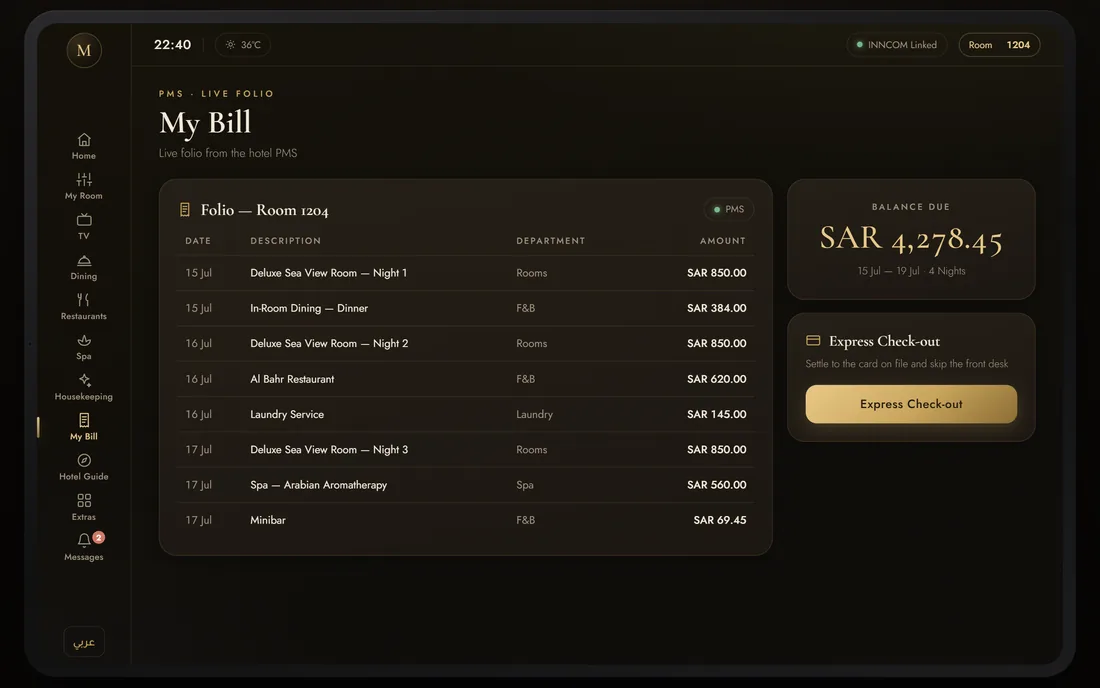
The tablet is the guest's single front door to the property: lighting and climate through the INNCOM by Honeywell gateway, dining and spa from the same menu system the kitchen works from, and a live folio drawn from the PMS so the balance is never a surprise at the desk.
What makes in-room hotel technology hard to get right?
A tablet bolted to a wall in a suite is the least forgiving interface there is. Its user is tired, unfamiliar, often not a native English speaker, and will not read instructions. It also has to be handed to a stranger every four nights without leaking anything about the last guest.
What does it actually look like?
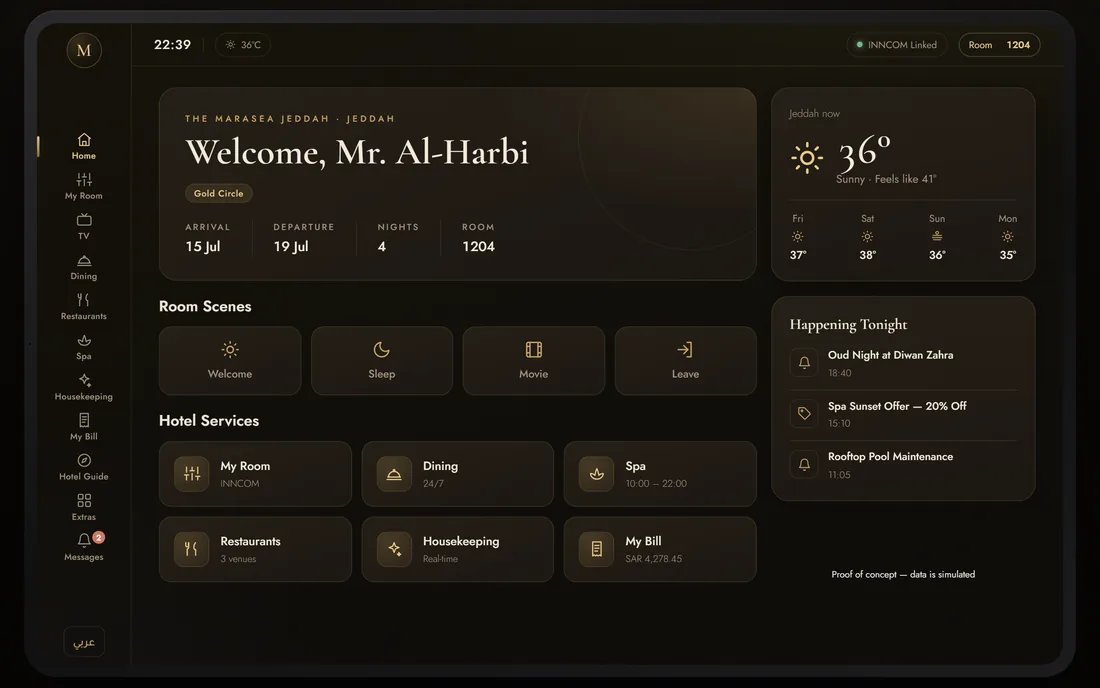
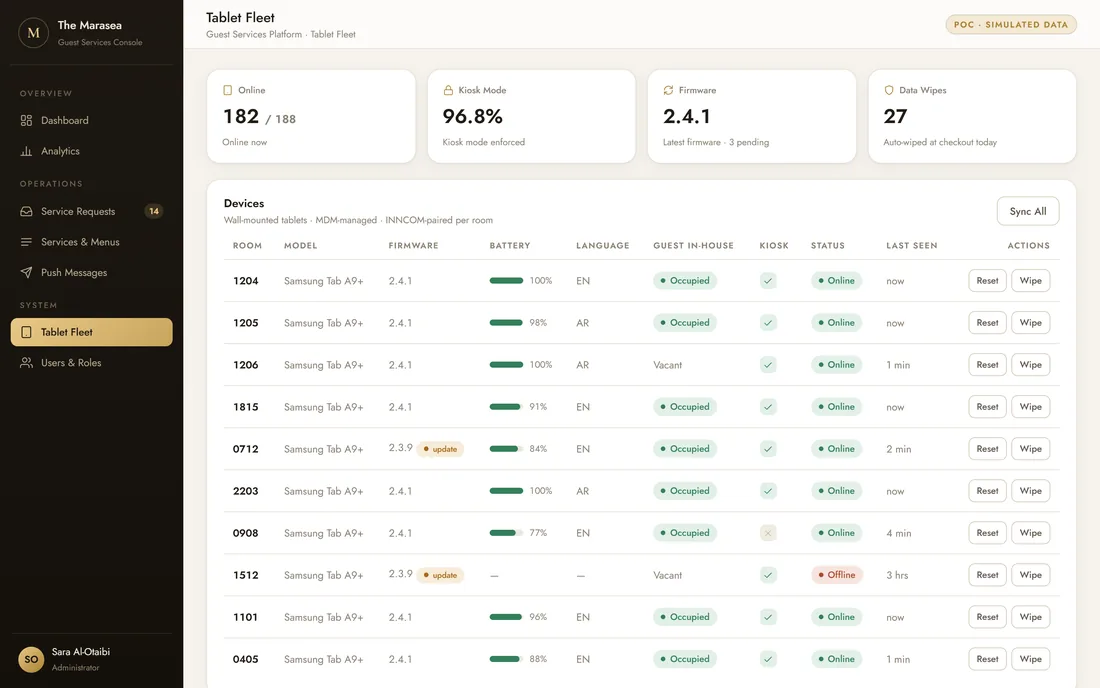
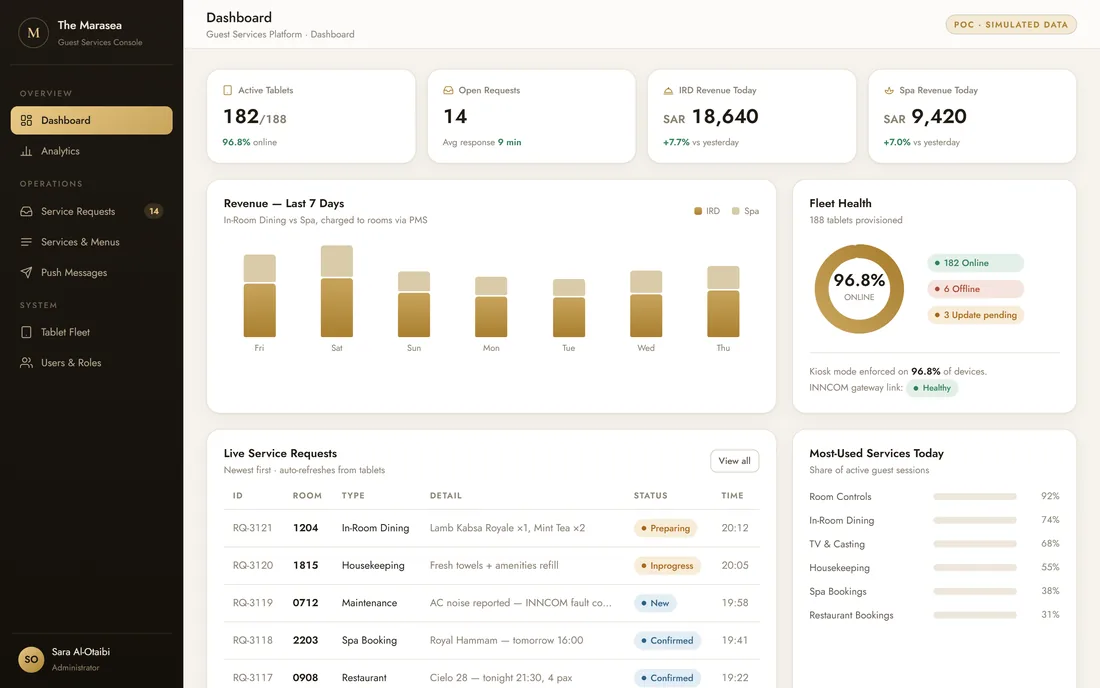
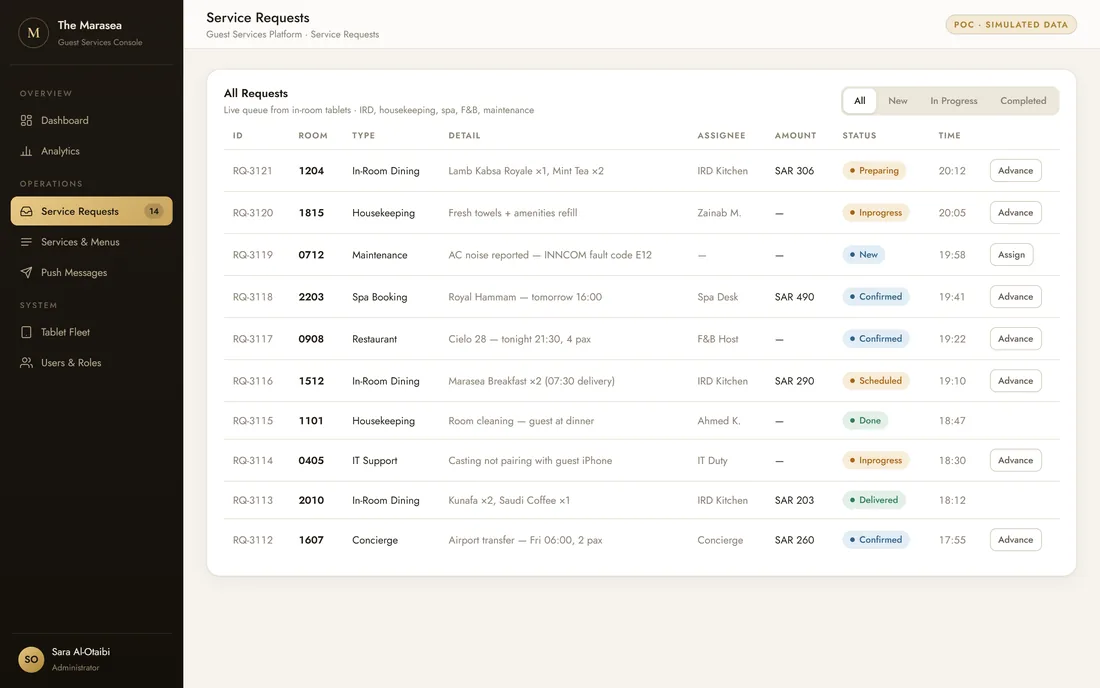
Two very different surfaces built from one system: a dark, gold-lit tablet made to be read from a bed, and a staff console made to be worked from a desk at speed. The same service vocabulary runs through both.
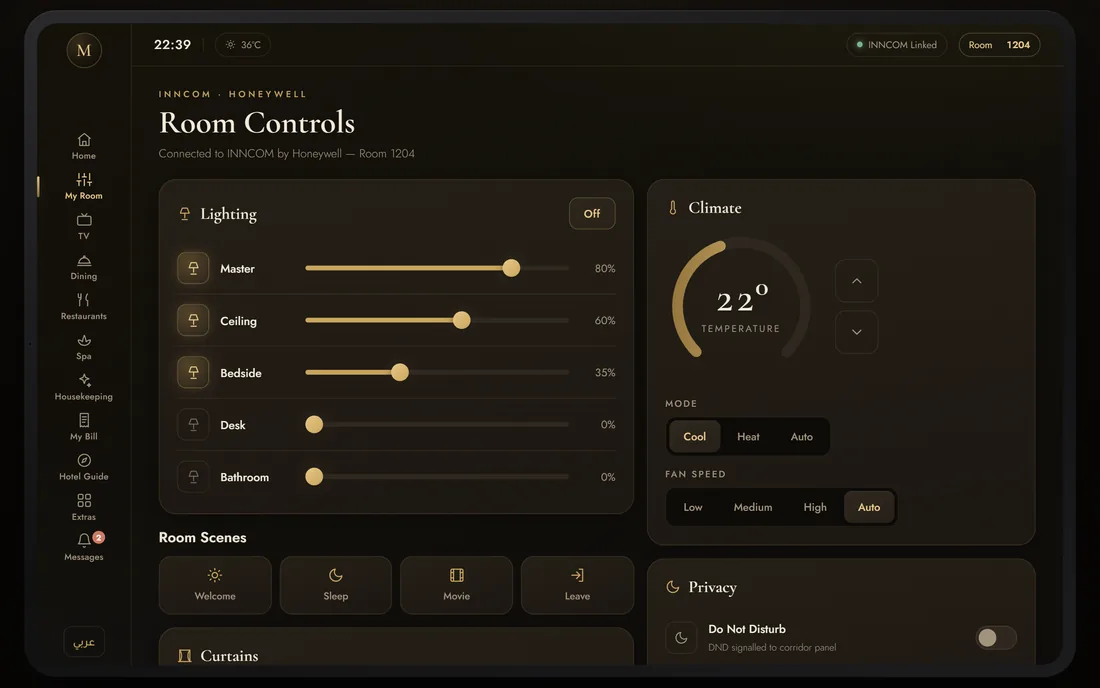
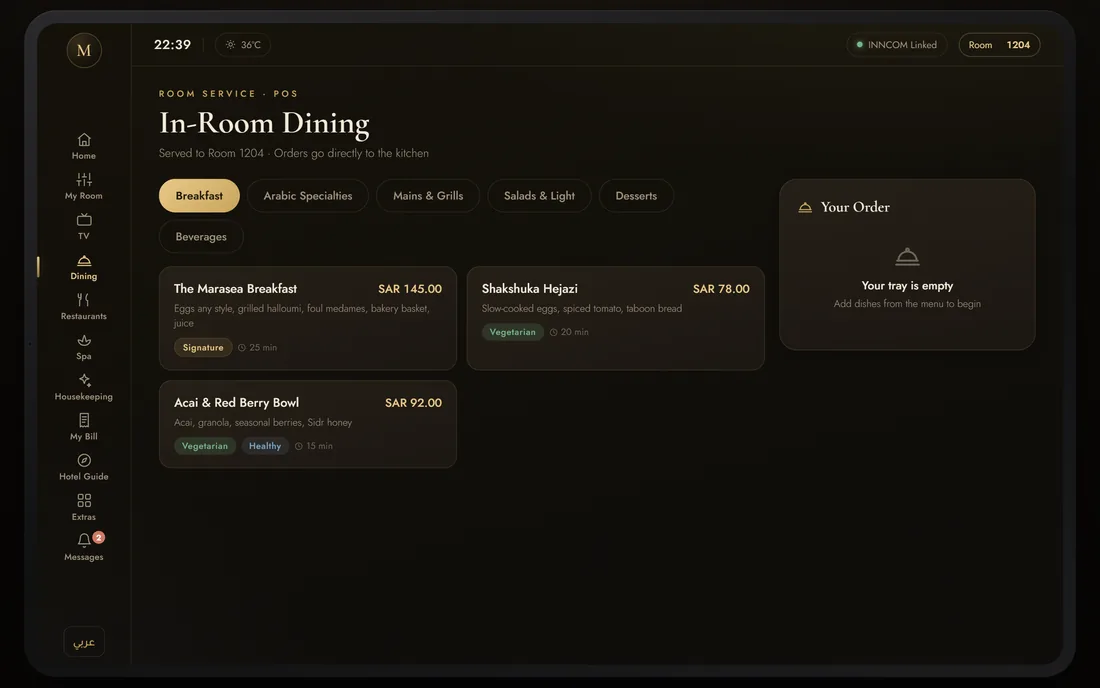
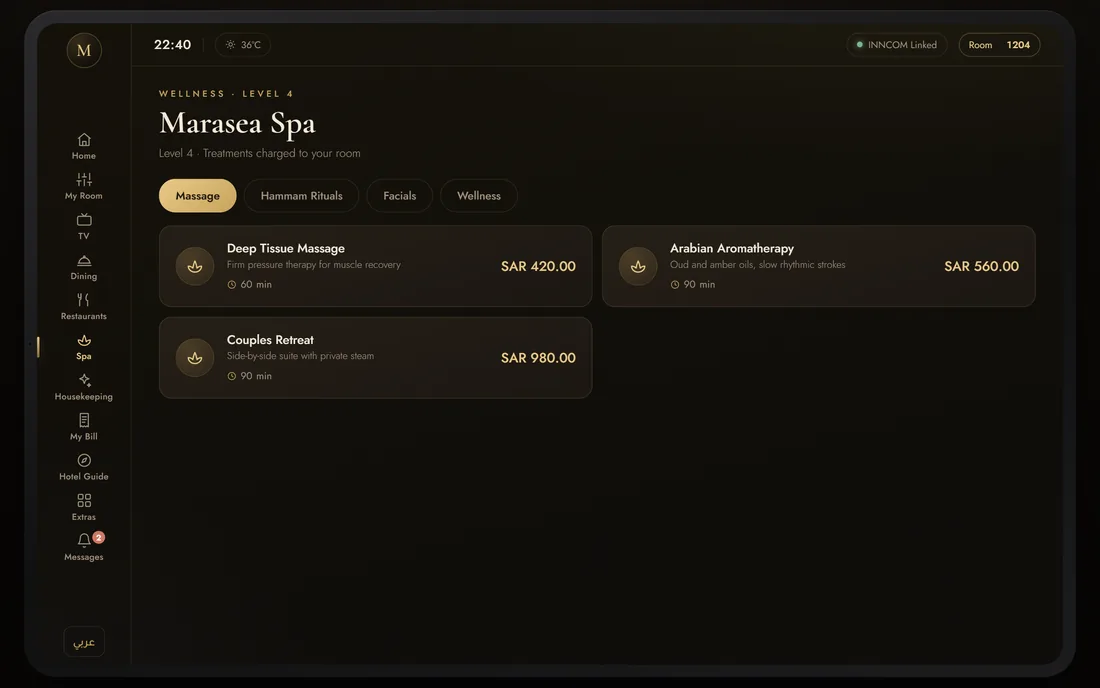
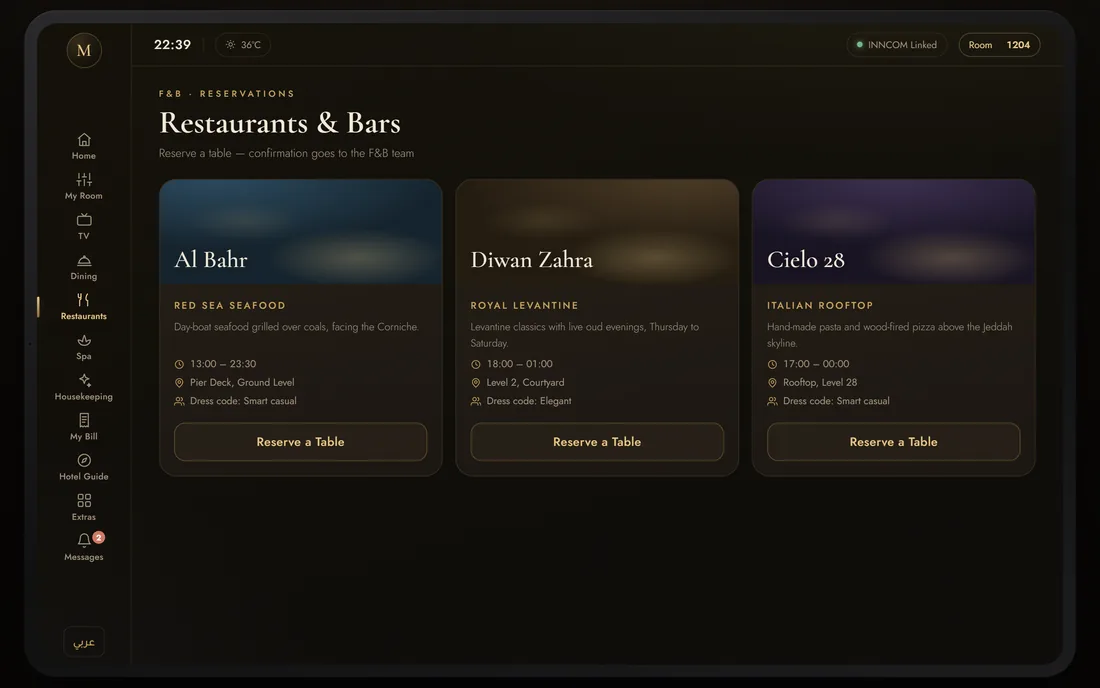
In-room tablet
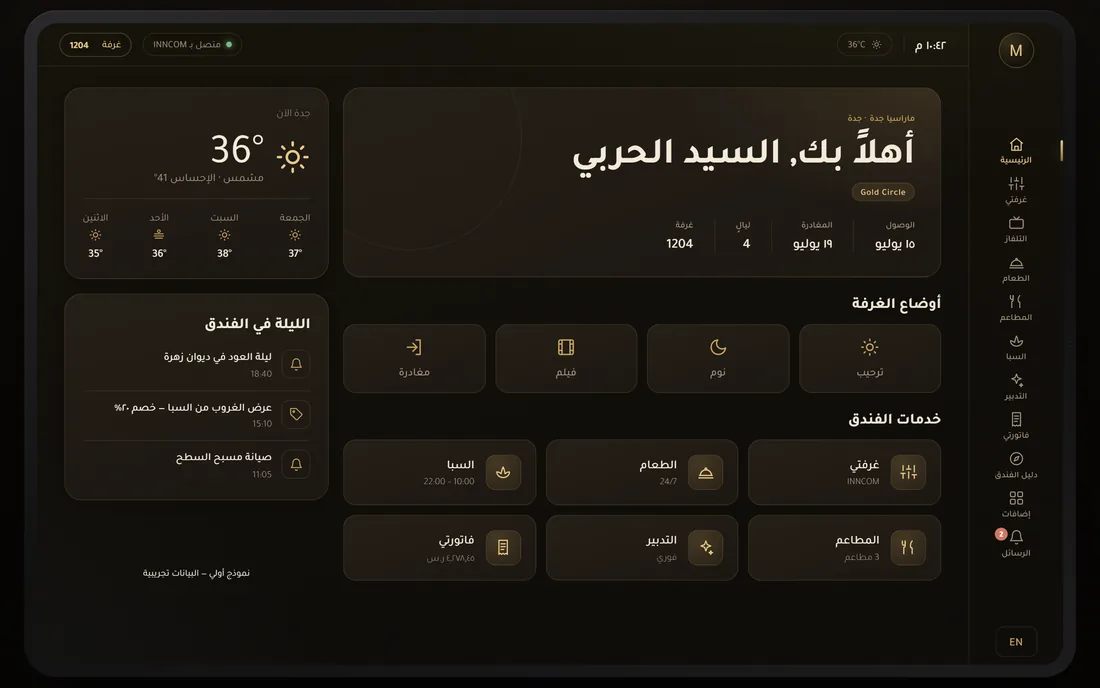
11 sectionsHome, My Room, TV and casting, in-room dining, restaurants, spa, housekeeping, My Bill, the hotel guide, extras and a messages inbox - all bilingual, all reachable from a fixed rail down the left edge.
- INNCOM room controls
- Dining & spa ordering
- Live PMS folio
- English / Arabic RTL
Service operations
7 request typesDining, housekeeping, maintenance, spa, restaurant, IT and concierge requests in one queue, each with a room, a department, an assignee and a status that moves.
- Timed queue
- Routed by department
- Status progression
Roles & permissions
6 staff rolesAdministrator, F&B manager, housekeeping supervisor, front office, spa manager and engineering, each mapped across six console modules in one permission matrix.
- Department accounts
- Module-level access
Fleet & integrations
MDM + PMS + INNCOMTablets managed as an estate with kiosk mode, firmware and remote wipe; guest data, billing and events from the PMS; lighting, climate and fault codes over the INNCOM by Honeywell gateway. The TV set-top experience is the same interface at ten feet.
- Kiosk mode
- Firmware & remote wipe
- PMS folio & events
- INNCOM gateway
What happens between a tap at the bedside and a charge on the folio?
The reason a guest-service platform is worth building is that this path currently runs through a phone call, a handwritten docket and a POS terminal. Here it is one chain, and every link names who is holding it.
- 01
The tablet greets by name
Stay dates, nights, loyalty tier and room number arrive from the PMS the moment the guest picks it up.
Guest - 02
The room is set
Lighting, climate, fan and curtains through the INNCOM gateway, or one tap on Welcome, Sleep, Movie or Leave.
Guest - 03
An order is placed
In-room dining, a spa treatment or a restaurant table, from a bilingual menu with dietary tags and prices.
Guest - 04
It lands in the queue
The request appears in the staff console with room, type, detail, amount and a timestamp, newest first.
System - 05
A department picks it up
F&B, housekeeping, spa, engineering, front office or IT - routed by type, with a role that can act on it.
Staff - 06
The status advances
New, in progress, preparing, scheduled, confirmed, completed - visible to the team working it.
Staff - 07
The hotel pushes back
Offers, alerts and notices are targeted at rooms and arrive in the tablet's Messages inbox.
Staff - 08
The charge posts to the folio
My Bill updates line by line from the PMS, so the balance is known long before the guest reaches the desk.
System - 09
Express check-out wipes the room
The guest settles on the tablet, their data is cleared, and the device resets for the next arrival.
Guest
Scroll the path sideways to follow it step by step
What does it look like, and why?
A room at 22:40 is dark, so the interface is too. Warm brown-blacks carry the surfaces, a single antique gold marks anything you can act on, and the accent lines are gold at low alpha rather than grey - which is what keeps a dark UI feeling like a hotel rather than a dashboard.
Aa
Primary typeface
Cormorant Garamond
A B C D E F G H I J K L M N O P Q R S T U V W X Y Z
a b c d e f g h i j k l m n o p q r s t u v w x y z
0 1 2 3 4 5 6 7 8 9 & ? ! £ $ €
46pxWelcome, Mr. Al-HarbiH119pxHotel ServicesH315pxCard titles and primary interface labelsLabel13pxBody copy and list rowsBody12pxMeta lines, hours and secondary detailMeta11pxTHE MARASEA JEDDAHEyebrowA high-contrast garalde for the one line that should feel like stationery, and a geometric sans for everything functional - which keeps the warmth in the greeting and the clarity in the controls. Eyebrows are tracked out to 0.32em so small caps still read from across a room. Arabic sets in Tajawal at the same optical weights. Cormorant Garamond, Jost and Tajawal are open-licence typefaces; the specimen above falls back to the nearest available face if they are not installed on your device.
Building a hotel guest-service platform
What hospitality groups ask us first, answered plainly.
Ask us yoursHow long does it take to build an in-room guest services platform?
A scope like this - a bilingual guest tablet, a staff console, service routing, device management and PMS plus room-automation integration - is a several-month programme. The integrations set the pace rather than the screens: a PMS folio and an INNCOM-class room controller each have their own certification and test-property cycle, and both need a defined behaviour for when the link is down.
Does it need to integrate with our PMS?
For the parts guests care about, yes. The named welcome, the stay dates, the loyalty tier and the live folio all come from the PMS, and without it the tablet becomes a menu rather than a service. Room controls are a separate link - here the INNCOM by Honeywell gateway - and the two are deliberately kept independent so one failing does not take the other down.
How do you handle Arabic and other right-to-left languages?
As a layout problem, not a translation problem. The whole interface mirrors: navigation, cards, sliders, tables and reading order, with content carried in both languages rather than machine-swapped at render time. Both versions are designed to the same hierarchy so a wall-mounted screen reads identically at arm's length in either.
What happens to a guest's data at check-out?
Express check-out clears it. The guest settles on the tablet, the session data - folio, messages, orders, preferences - is wiped, and the device returns to a reset state ready for the next arrival. Because the tablets are managed as an estate, housekeeping and IT can also reset or wipe a device remotely from the console.
Can the same interface run on the in-room TV?
Yes, as a ten-foot variant of the same system. The information architecture, the service vocabulary and the design tokens carry over; what changes is the input model and the type scale, since a TV is read from across the room and driven with a remote rather than a finger.
Related work
Putting a screen in every room?
Tell us how your business actually works and we will tell you honestly what it takes to build. See more of our work or what we do.
Book a 15-minute call