


One pipeline per property
Selling a house in the Netherlands means gathering the WOZ value, the Kadaster registry record, professional photos and floorplans - each from a different system - before anything can be listed. Ciphix turns that into a single gated case pipeline that ends in one upload-ready record.
Market
- Netherlands
- Property sales
Model
- Gated case pipeline
- Track by track
Data sources
- WOZ
- Kadaster
- Van Gassen CMS
Who uses it
- Real estate agents
What actually goes into listing a property for sale?
Far more than a photo and a price. A Dutch property sale needs the official valuation, the land-registry record, commissioned photography and drawn floorplans - each requested from a separate source, on its own timeline.
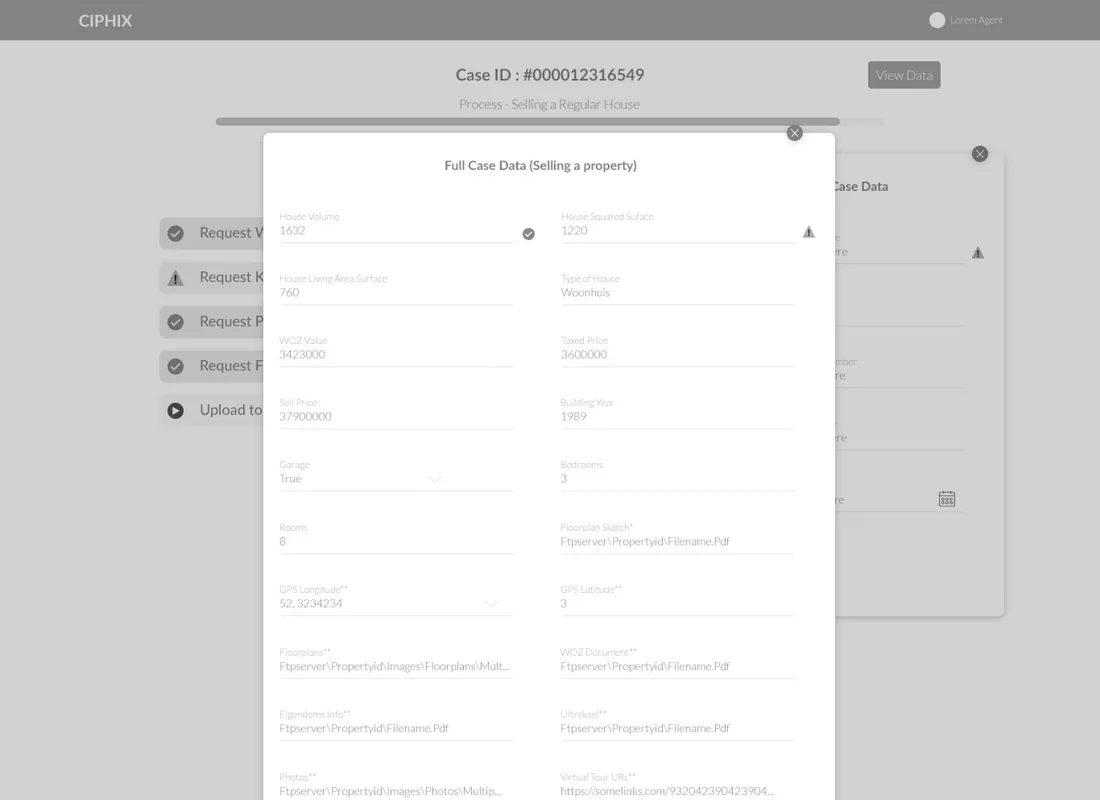
Every source resolves into one case record
Ciphix runs a case per property and a track per data source. As each track completes, its result lands on the case, until the whole thing compiles into a single Full Case Data record - ready to push to the listing CMS instead of re-keyed into it.
Why does preparing a property to sell resist ordinary tools?
Three things make it awkward for a to-do list or a shared drive. A case tool has to hold all three: the data lives in separate systems, the steps have a real order, and the output has to be one clean record a CMS will accept.
| Preparing a listing | Across separate systems | In Ciphix |
|---|---|---|
| WOZ value | Looked up on a government portal, copied by hand | Requested as a track and stored on the case |
| Kadaster record | A separate registry login and export | Pulled into the same case pipeline |
| Property photography | Emailed, chased and re-sent | Commissioned as a gated track with a clear status |
| Floorplans | PDFs sitting in an inbox | Attached to the case as a track deliverable |
| Building the listing | Re-keyed field by field into the CMS | Compiled Full Case Data uploaded to Van Gassen CMS |
| Knowing what is left | Held in one person's memory | The pipeline shows exactly which track is still open |
How does a new case become a live listing?
This is the gated sequence Ciphix runs for a regular house sale. Each track requests from a different source, and the next one unlocks only when it lands - so a case moves forward in one direction, never half-finished.
- 01
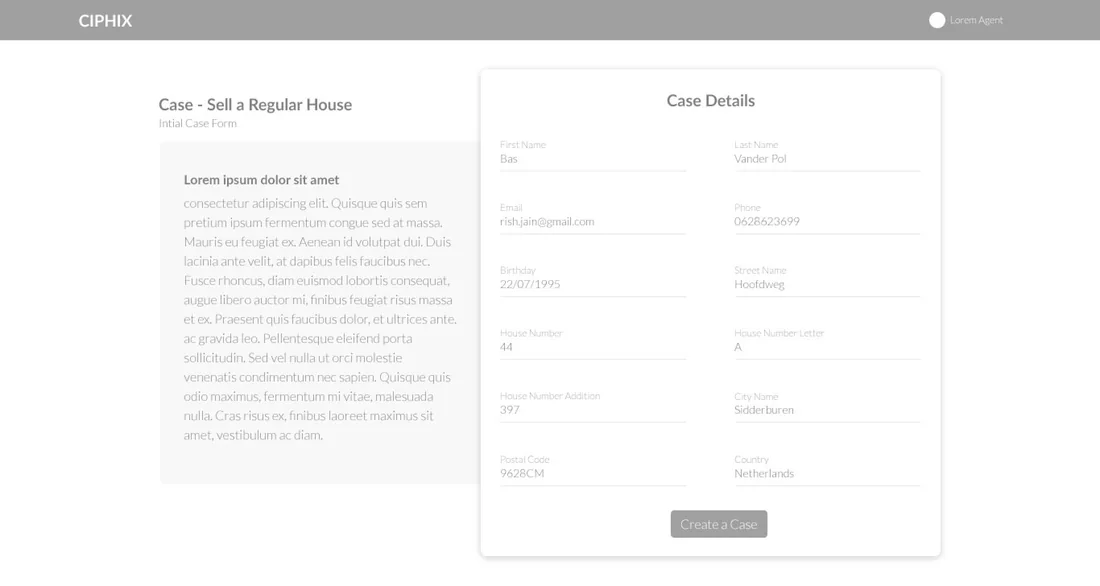
Open the case
An agent creates a case with the property's street, number and city, and picks the sale process.
Agent - 02
Request WOZ value
The official valuation is requested as the first track and recorded against the case.
WOZ registry - 03
Request Kadaster info
The land-registry record for the property is pulled into the same pipeline.
Kadaster - 04
Commission photographer
Photography is booked as a gated track, with its status visible on the case.
Photographer - 05
Request floorplan
Floorplans are requested and attached to the case as a deliverable.
Floorplan service - 06
Compile full case data
House volume, area, WOZ value, building year, documents and photos resolve into one record.
System - 07
Upload to the CMS
The completed case is pushed to the Van Gassen CMS as a listing-ready record.
System
Scroll the pipeline sideways
The whole process on a single screen
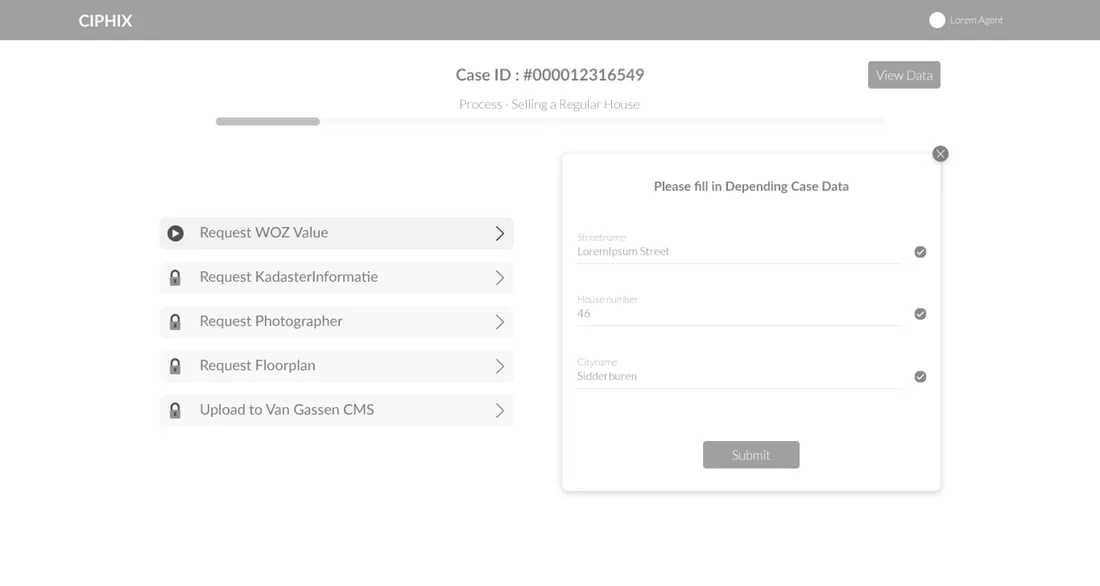
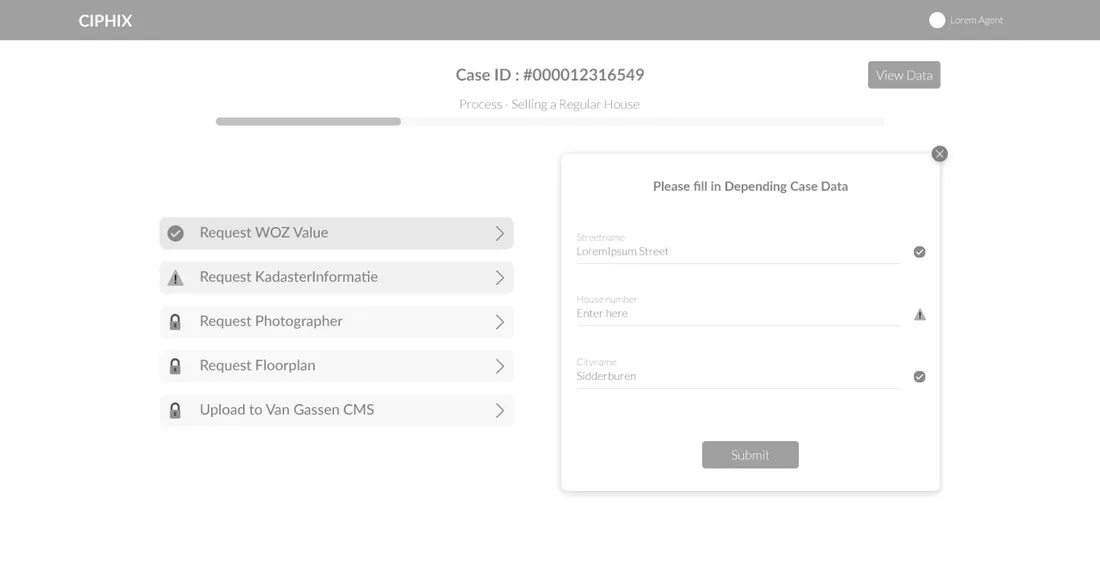
A case opens on its track view: the process it belongs to, the track that is active now, and everything still locked ahead of it - with each track's own data form to its right.
The header names the case and the process it follows - here, selling a regular house - with a progress bar underneath.
Exactly one track is open at a time. Here the WOZ value request is live and ready to be worked.
Kadaster, photographer, floorplan and CMS upload stay locked until their upstream tracks complete.
Each track opens its own small form - just the fields that track depends on, validated as they are filled.
The final track pushes the compiled case to the Van Gassen CMS, closing the loop from intake to listing.
What does any multi-source case tool need to get right?
Six things separate a case-orchestration tool people trust from a shared drive with good intentions. They came out of modelling this pipeline and hold well beyond property sales.
- A track per source, not a checkbox. Each external system is its own unit of work with its own status, so 'waiting on the photographer' is a state, not a sticky note.
- Dependencies that actually gate. If a step can start before its inputs exist, someone will start it - so downstream tracks stay locked until they can succeed.
- One record as the destination. Every track feeds the same structured case, so the end state is upload-ready rather than a pile of attachments.
- Progress you can see at a glance. The case shows which track is open and which are done, so nothing stalls silently.
- The right fields at the right moment. Each track asks only for the data it depends on, validated in place, instead of one giant form up front.
- A clean handoff out. The pipeline ends in a single push to the system of record, so the tool orchestrates the work without becoming another silo.
Building a case-management workflow tool
What teams with multi-step, multi-source processes ask us first.
Ask us yoursWhat is a gated case pipeline?
It is a process where each step, or track, unlocks only when the steps it depends on are complete. In Ciphix a property case cannot request a listing upload before its valuation, registry record, photos and floorplans exist. Gating turns an informal checklist into a workflow that cannot reach the end with a piece missing.
Can it pull from external systems like WOZ and Kadaster?
That is the core of it. Each data source - the WOZ valuation, the Kadaster land registry, a photographer, a floorplan service - is modelled as its own track that requests and records its result against the case. The design treats every source as an independent unit of work with its own status, so the tool orchestrates the gathering rather than replacing the sources.
How long does it take to build a workflow tool like this?
A case-orchestration tool at this shape - a case per record, gated tracks per source, per-track forms and a final push to a system of record - is a focused build rather than a year-long programme. What moves the date most is how many external integrations are live from day one versus captured manually, and how strict the dependency rules between tracks need to be.
Does it replace the listing CMS?
No, and it should not. Ciphix orchestrates the work of preparing a property and then hands one clean, structured record to the CMS the agency already uses - here, the Van Gassen CMS. It sits in front of the system of record as a pipeline, not on top of it as a replacement.
Can the same approach work outside property sales?
Yes. Any process that gathers data from several sources in a required order and has to produce one clean record is the same shape - onboarding, claims, compliance intake. The tracks, the gating and the single-record destination transfer directly; only the sources and fields change.
Related work
Have a process stuck across five systems?
Tell us how your business actually works and we will tell you honestly what it takes to build. See more of our work or what we do.
Book a 15-minute call