
A website redesign is a migration. The moment URLs, templates, or page copy change, Google has to re-learn a site it already understood, and anything you don't deliberately carry over gets dropped. Most post-redesign traffic loss traces back to old URLs that stopped resolving cleanly, not to the new design.
Most redesign checklists are a flat list of tasks. This one is sequenced by when, because order saves the rankings. A redirect map written after launch is cleanup. Written before the build, it's insurance.
The position I'll defend below: the riskiest moment isn't launch day. It's week three, when the war room has disbanded and nobody's reading the server logs any more.
how far Google's crawlers follow a redirect chain before stopping
the post-launch window to watch index coverage and 404 spikes
how long Google's site-move guidance asks you to keep redirects up
Why do website redesigns lose traffic at all?
Redesigns lose traffic when the signals Google attached to the old site stop being findable: changed URLs without redirects, rewritten or deleted copy, collapsed internal linking, dropped title tags, removed structured data. Rankings sit on specific URLs and their content. They don't sit on your brand or your domain in the abstract.
Treat the index as a map with house numbers on it. A redesign renumbers the street. If /services/web-design.html becomes /services/web-design/ and nothing connects the two, years of authority on the old address stop being reachable.
Internal linking is the loss nobody budgets for. Old sites accumulate links organically: a sidebar block, a related-posts widget, six blog posts pointing at one service page. A clean build with a five-item nav leaves that page taking three internal links where it took forty. Nothing broke. It just matters less to the crawler now. Trimming does the same from the other side: 1,400 words become 400, and the page loses the phrasing it ranked for across search, answer engines and generative results alike.
What should you capture before you touch anything?
Before any build work starts, capture five artefacts from the live site: a full URL inventory, a traffic and ranking baseline, your top organic landing pages, your backlink profile, and current crawl and index status. Export each to a dated file. You can't diagnose a drop against a baseline you never took.
Run this before a single template exists.
- Crawl the live site: every 200 URL with status, title, meta description, H1, canonical.
- Merge three URL sources: crawl, sitemap, Search Console Pages report. Orphans hide in the gaps.
- Pull server access logs; extract every URL Googlebot actually requested.
- Baseline organic sessions by landing page into a file, not a dashboard view.
- Baseline Search Console clicks, impressions and position per page. That history rolls off.
- Rank-track your top 50 keywords from two weeks out, so you own a line not a reading.
- Export the backlink profile by referring domain. Anything carrying external links must survive.
- Flag the top 20 organic landing pages for review. Human eyes, not a spreadsheet rule.
- Record index status: pages indexed, pages excluded, reasons given.
- Capture structured data coverage on each main template.
- Build the redirect map as a two-column sheet; have a person read the top 100 rows.
- Lock a rollback plan: tagged release, database snapshot, DNS TTL lowered before cutover.
Item 12 gets skipped constantly. Lowering TTL takes five minutes and decides whether you revert in ten minutes or wait out 24 hours of propagation.
How do you build a redirect map that doesn't leak?
A redirect map pairs every old URL with exactly one new URL using a 301 permanent redirect. Map like for like: the old pricing page points at the new pricing page. Avoid chains, where A redirects to B and B redirects to C. Never bulk-redirect retired URLs to the homepage, which engines commonly treat as a soft 404.
The homepage dump is the laziest failure here and it's everywhere. One catch-all rule, the deploy passes, every old URL returns a tidy 200, and six weeks later the blog's traffic is gone.

| Status / method | What it signals | Use it when | The failure mode |
|---|---|---|---|
| 301 Moved Permanently | Moved for good; pass signals on | Any URL that changes in a redesign | Blanket-applied to the homepage |
| 302 Found | Temporary; keep the old URL indexed | Short detours: an A/B test, a seasonal page | Left on; the new URL never takes over |
| 307 Temporary Redirect | Temporary, request method kept | HSTS-forced HTTPS; temporary non-GET moves | Chosen by someone who meant "permanent" |
| 308 Permanent Redirect | Permanent, request method kept | Permanent moves on POST/PUT and API routes | Used for pages; 301 has broader support |
| Meta refresh | An HTML hint, not a server instruction | Almost never; untouchable legacy pages | Slow, patchily honoured, missed in audits |
| JavaScript redirect | Fires only if the crawler runs JS | Almost never in a migration | Invisible to crawlers that skip JS |
| 410 Gone | Deleted on purpose, not coming back | Retired content with no equivalent | Applied to pages that do have a new home |
| 404 Not Found | This URL doesn't exist | Old URLs with no traffic and no links | Left to pile up across URLs that had both |
Three rules keep the map honest. One hop only, because every hop burns crawl budget and Google's crawlers follow up to 10 redirect hops by default before they stop. Handle the variants: trailing slash, uppercase paths, www versus bare domain, http versus https. Test against staging before cutover, so every row shows one 301 landing on one live 200. Leave the redirects up for at least a year, which is what Google's own site-move documentation asks for; deleting the map at the next redesign loses the same traffic twice.
What has to carry over from the old site?
Carry over the elements Google already scored: title tags, meta descriptions, H1s, canonical tags, structured data, internal links, image alt text, and hreflang if you run multiple languages. Template rebuilds drop these silently, because the new theme generates its own defaults. Diff old against new, field by field, before launch.
The canonical tag bites hardest. A staging build with <link rel="canonical" href="https://staging.example.com/..."> in the layout ships straight to production, and every live page then tells Google the real version sits on a password-protected domain. Perfect to a human. Poison to a crawler. Titles fail more quietly, when the CMS auto-generates Home | Brand across half the site.
Structured data disappears whenever a theme changes. Your old build emitted Product, FAQPage and BreadcrumbList markup; the new one emits none because nobody ticketed it. That costs you in Google and more in AI answers, which lean on clean structure to decide what to quote, so know how answer engine optimization actually works before signing off templates. Alt text is the quiet one: assets get re-uploaded, the fields come back blank, image traffic falls.
What do you check during launch week?
Launch week has six checks: robots.txt, the noindex directive, the XML sitemap, analytics and Search Console, redirect status codes, and Core Web Vitals on mobile. Run all six within an hour of cutover. The most damaging redesign losses come from one line of staging config reaching production.
That line is the fatal error. Staging is protected with either Disallow: / in robots.txt or a site-wide <meta name="robots" content="noindex">. Promote the staging build and the protection promotes with it, so the new site goes live telling Google to drop it from the index.
- Fetch
/robots.txtand read it yourself. - View source on three key pages for
noindex, then check their headers forX-Robots-Tag. - Spot-check 20 redirect rows live: one 301, one live 200.
- Submit a fresh sitemap of new URLs only, and confirm analytics fires on the new templates.
Keep the old sitemap submitted next to the new one for a few weeks. It prompts Google to recrawl the old URLs, which is how it finds your 301s faster.
Now measure on real devices. Google's thresholds are LCP under 2.5 seconds, INP under 200 milliseconds, and CLS under 0.1, on mobile. Redesigns regress here routinely: three web fonts, a hero video, an animation library the old site never carried. Read the link between Core Web Vitals and revenue before anyone approves a 4 MB hero loop.
What do you watch for the 30 days after?
For 30 days after launch, watch four signals weekly: index coverage in Search Console, 404 spikes in server logs, ranking movement on your top landing pages, and crawl volume. Book calendar reminders for day 14 and day 21. Attention drops off long before the risk does.
This is where redesigns actually go wrong. Launch day has everybody watching. By day ten the developers are on the next project and nobody's opening Search Console. Google is still part-way through recrawling, so the consequences arrive in week two or three, exactly when the logs are closed. That's an attention problem, and a calendar entry fixes it.
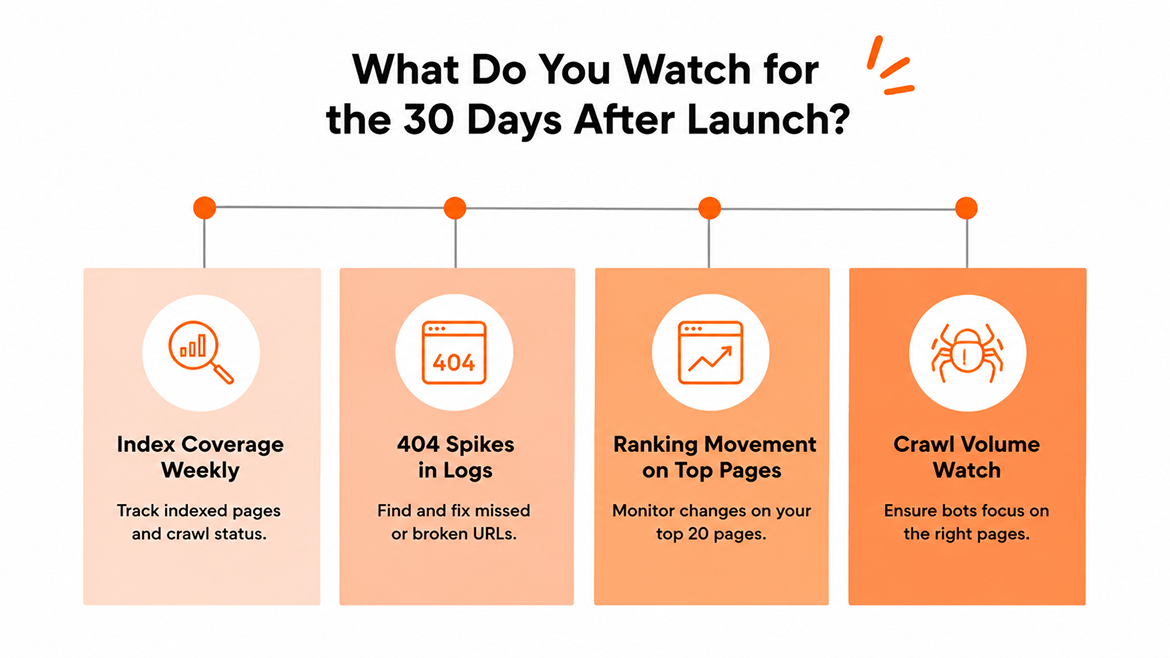
Logs beat dashboards. Search Console's own documentation says collected data should normally be available in 2-3 days, and the report filters some queries out entirely. Access logs are complete and immediate. Grep the 404s, group by URL, sort by count. Anything recurring is a row the map missed.
Index coverage, weekly. Watch the indexed count climb toward the sitemap count. A swelling "Crawled, currently not indexed" bucket means the build is making pages Google won't keep. Ship 4,000 filter URLs and Googlebot spends its budget there instead of on your money pages.
Top 20 pages only. Full keyword sets are noisy after a migration. The pages from step 8 tell you the truth faster.
When is a traffic drop normal, and when do you roll back?
A short dip after a redesign is expected while search engines recrawl changed URLs. It's normal when it's shallow, hits impressions more than positions, spreads evenly across the site, and starts recovering as recrawl completes. It's a problem when top landing pages fall out of the index, 404s climb, or the drop deepens after week two.
Shape matters more than size. A broad wobble that flattens out is the index catching up. A cliff on your five highest-converting pages while everything else holds steady is a mapping error, findable in an hour against the pre-launch inventory. Recovery timelines vary with site size and crawl frequency, which is why the baseline matters more than any benchmark. Without it you're arguing about whether traffic feels down.
My honest view on rollbacks: almost always the wrong call. You migrate twice, confuse the crawler twice, take the hit twice. Fix forward. Roll back only when the platform genuinely can't do SEO: no per-page titles and canonicals, no server-rendered HTML, no server-side redirects.
Cheaper still, stop treating the redirect map as a launch-week task. On the website builds and rebuilds we run, the URL inventory and redirect map get scoped alongside the design brief, which is how a rebuild fits a roughly two-week delivery window instead of a month of firefighting. Book a call and we'll walk your current URL set.
Frequently Asked Questions
How long does it take to recover rankings after a website redesign?
It depends on site size, crawl frequency and how clean the map is, so any single figure would be a guess dressed as a rule. Direction is the signal. Past week four and still falling means a technical fault.
Do I still need redirects if the URLs aren't changing?
Yes, partially. Protocol and hostname changes still need handling, and platforms quietly alter trailing slashes or casing during a rebuild. Crawl both versions and diff.
Should I keep the old XML sitemap after launch?
Keep it submitted for a few weeks alongside the new one. It encourages Google to recrawl the old URLs, which is how it finds your 301s.
Is a 302 ever acceptable during a migration?
Only for genuinely temporary states, like a page down for maintenance. Redesign URL changes take a 301. Temporary redirects get forgotten and sit there a year.
What's the single most common fatal error at redesign launch?
Shipping staging's crawl protection to production: a Disallow: / left in robots.txt, or a site-wide noindex inherited from the staging template. It removes the whole site from search and runs unnoticed for weeks, because the page looks perfect to every human.
Can I change the design and the URL structure at the same time?
You can, and usually you should, since separating them means two migrations and two recovery periods. The condition is a redirect map reviewed before the build starts.
Have a project in mind? Let's scope it together.
You get a named team, written estimates, full code and IP ownership, and 48-hour response times. CMMI Level 5 certified. 700+ projects delivered across the UK, US, UAE, and Australia.