


The seller's shop,in a pocket.
A mobile app that turns a marketplace vendor's phone into a full storefront — onboard and get verified, build a catalogue, flip the shop online, and work every order from the same screen.
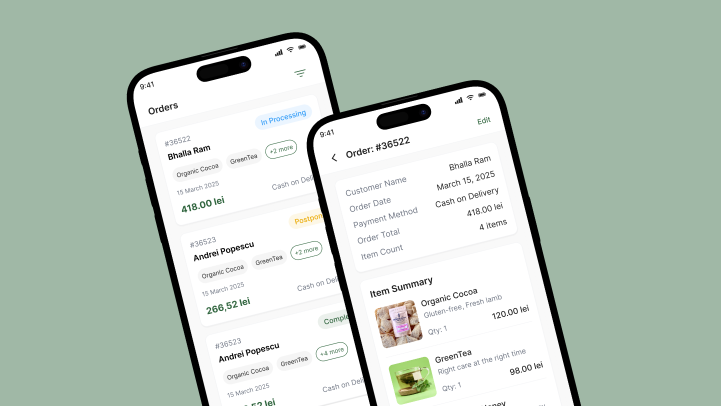
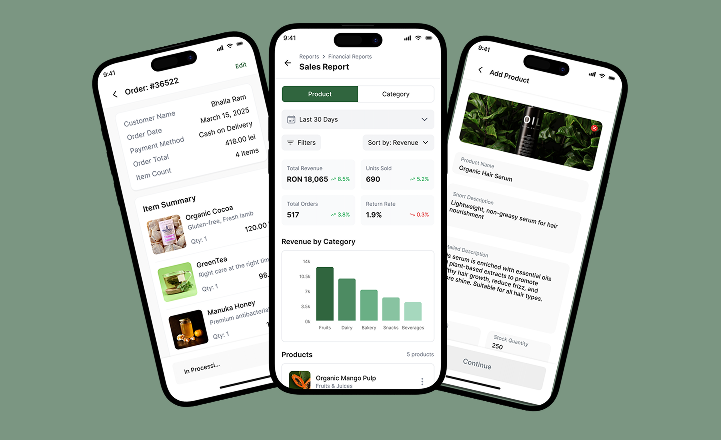
A whole storefront that fits on a phone
The vendor signs up, submits the documents that get them verified, then builds a catalogue and starts taking orders — with an accepting-orders switch, earnings and stock at a glance, and every order tracked through to delivery, all in one app.
Verified before they go live
Onboarding collects company information, location and documents, then holds the seller behind an approval gate, so the marketplace controls who can actually sell.
Runs the shop, not just lists it
An accepting-orders toggle takes the store online or offline, while earnings, order activity and low-stock alerts sit on the home screen the moment the app opens.
Built for more than one market
Localisation and per-market currency are baked in — the seller picks a language on the way in, and orders settle in the local currency of the region they trade in.
Why build a dedicated app for marketplace sellers?
Most small vendors run their business out of chat threads and a notebook. Three things break the moment a marketplace tries to scale on top of that.
Anyone can claim to be a shop. Without verification a marketplace fills with sellers nobody vetted — onboarding has to collect real documents and gate going live behind an admin approval, not a checkbox.
A listing is more than a photo and a price. Products need images, descriptions, stock, categories and richer metadata, or the catalogue is too thin for a buyer to trust.
Orders arrive in every state at once. Processing, postponed, complete, cancelled — a seller needs all of it on one screen with filters, not scattered across messages they have to reconstruct by hand.
Set side by side against a chat thread and a notebook, the shift is concrete: getting verified moves from a screenshot in a DM to documents behind an approval gate, adding a product moves from a photo and a message to a full listing with stock and categories, and tracking an order moves from scrolling a thread back to a status pipeline with filters.
things break the moment a marketplace tries to scale on chat threads and a notebook
Vogo Family product scope
What the seller app had to get right
A single vendor has to be verified, stocked, discoverable and paid, all from a phone, with no back office behind them.
What it had to do
- Verify before going live. Company info, location and documents behind an admin approval gate.
- Make listing rich but fast. Images, descriptions, stock, categories and metadata.
- Build a real order pipeline. Processing, postponed, complete, cancelled — filterable with full detail.
- Put the shop in the seller's control. One toggle to go online or offline, earnings and stock on the home screen.
Why it was hard
- Anyone can claim to be a shop without real document verification.
- A listing needs more than a photo and a price to earn a buyer's trust.
- Orders arrive in every state at once — processing, postponed, complete, cancelled.
- The same app has to serve more than one country and currency, not just the first market.
What is actually inside Vogo Family?
Four modules a vendor lives in every day, from the document that gets them verified to the switch that opens the shop.
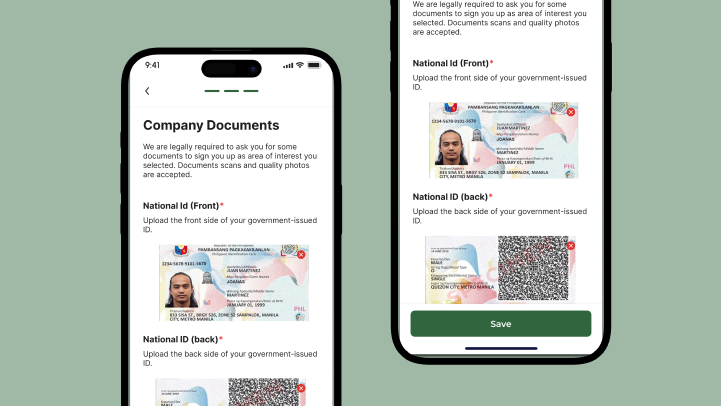
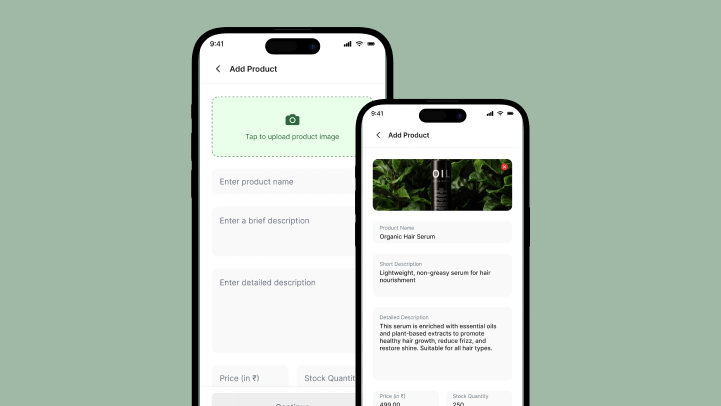
Onboarding & approval
Verified entrySign-in, language choice, company information, location and document upload — then an approval-pending state, because the marketplace decides who goes live, not the seller.
Product catalogue
Full listingsAdd and edit products with images, short and long descriptions, price, stock, categories and a provider link, plus rich metadata like a WhatsApp number, a video and labels.
Order management
Full pipelineOrders move through processing, postponed, complete and cancelled states, each with its items, buyer, date, amount and payment method, filterable and openable to a full order detail.
Storefront controls
Live switchAn accepting-orders toggle takes the shop online or offline in one tap, so a seller closes the store without disappearing from the marketplace.
How did we design and build it?
A seller app fails if it is either too strict to onboard or too loose to trust. The build order kept both in check.
- 01Approval gate
Design onboarding as a gate
Sign-in, language, company info, location and documents were sequenced so the marketplace gets what it needs to verify a seller before that seller can list a single product.
- 02Catalogue
Make listing rich but fast
The product form carries images, descriptions, stock, categories and optional metadata, laid out so a busy vendor can add a product in a minute and enrich it later.
- 03Order pipeline
Build the order pipeline
Order states, filters and a full detail view were designed around how a small shop actually works an order — accept, process, fulfil or cancel — rather than a generic list.
- 04Home controls
Put the shop in the seller's control
The accepting-orders switch and the home dashboard were the last layer, so a vendor can open, close and read their business at a glance without digging.
The seller's day, screen by screen
Every surface a vendor touches — from the approval that lets them in to the order they fulfil — designed for a phone held in one hand.
Accepting-orders toggle, earnings, order activity, stock and customer interactions in one dashboard.
The document upload that turns a sign-up into a verifiable business.
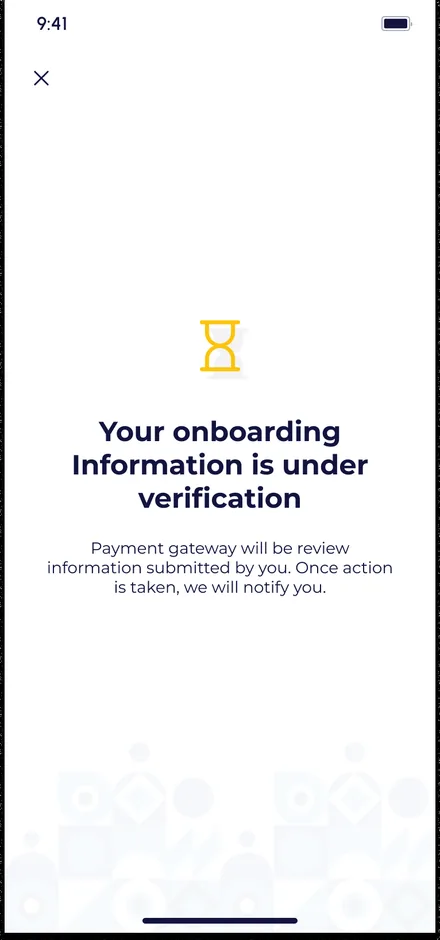
The state that holds a seller until the marketplace approves them to go live.
A full listing form — image, descriptions, price, stock, provider and rich metadata.
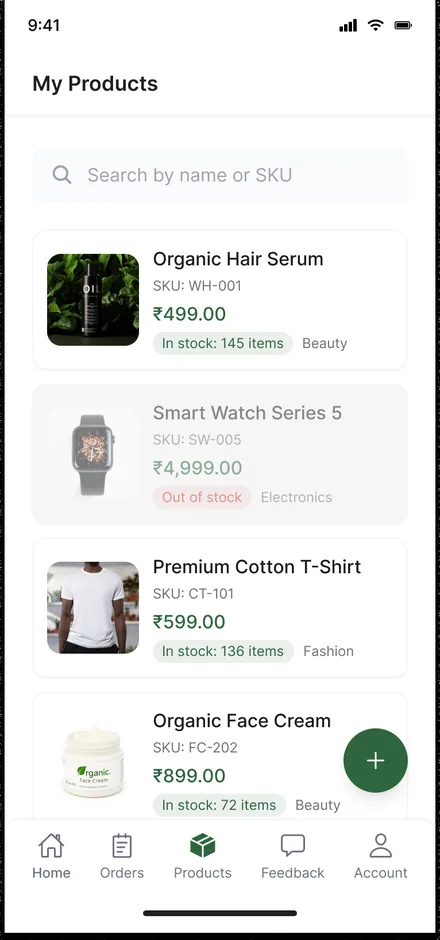
The vendor's own catalogue, ready to edit, restock or take down.
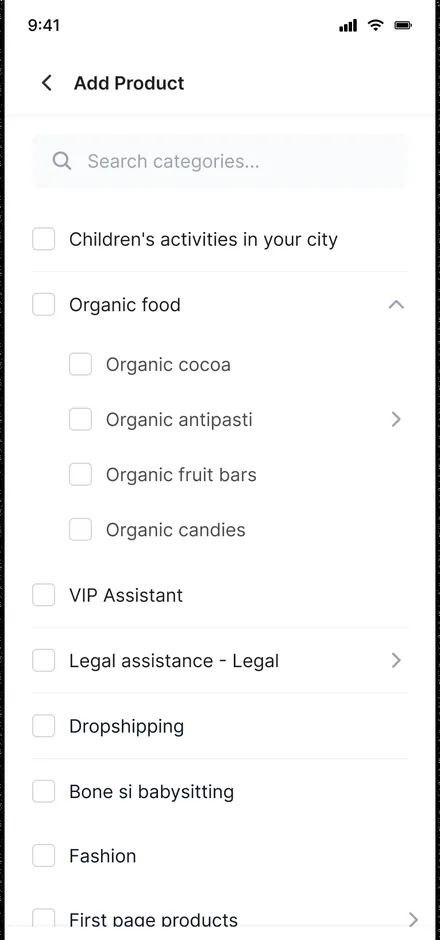
Category selection that keeps a growing catalogue browsable for buyers.
Every order with its state, items, amount and payment method, filterable in place.
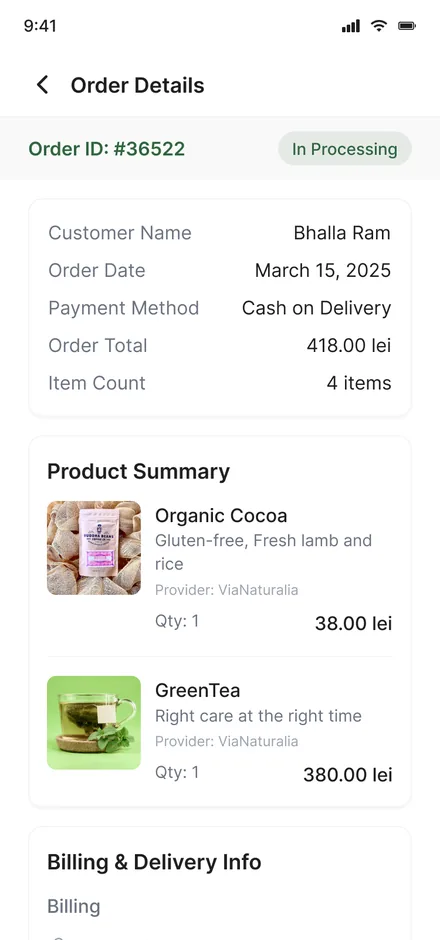
The full breakdown of a single order, ready to move through fulfilment.
What we'd tell another marketplace
Lessons from building the seller side of a multi-vendor marketplace.
Verification is a gate, not a checkbox
Collecting real documents at onboarding and holding a new vendor behind an admin approval keeps unvetted shops from going live.
Design the pipeline around real states
Order states, filters and a full detail view should match how a small shop actually works an order, not a generic list.
Build for more than one market from day one
Language selection and local-currency settlement are cheaper to bake in at the start than to retrofit once sellers in a second market sign up.
Building a marketplace seller app
What does the Vogo Family app do?
How long does it take to build a multi-vendor marketplace app?
Why does the seller need document verification?
Can it support more than one country or currency?
Building a marketplace your sellers will actually use?
Tell us how your business actually works and we will tell you honestly what it takes to build.