


From open shiftto paid out.
A gig staffing app that connects hourly workers with the businesses that need shifts filled. A worker browses gigs by date, claims the ones that fit, checks in on the day and is paid straight to their bank. We designed the whole worker experience, from the first shift to the last payout.

A worker app built around one shift at a time
The worker side is the app we designed end to end. A worker completes a vetted profile, browses gigs grouped by date, and works a clear lifecycle: apply or accept a direct request, claim the shift, check in on the day, mark it complete, and get paid. Every gig shows how many slots are still open, so a worker always knows whether a shift still needs people before they commit.
A vetted worker profile
Onboarding collects experience, certificates and licenses, a profile picture and photo ID, with an optional criminal-record check, so businesses are staffing people they can trust.
Filters that match real constraints
Distance, pay rate, total pay, pay frequency, gig length, transit access and more let a worker narrow a board of shifts down to the ones that actually work for them.
Paid straight to the bank
Banking is linked through Stripe and earnings settle as daily payouts, with a running payout history, so a worker sees exactly what they have earned and when it arrives.
Why is a gig staffing app hard to design well?
Short-notice shift work only works if the worker can trust the gig and act fast - three problems shaped every screen in the worker app.
A job board ends at the application. Answer → a gig that moves through applied, claimed, confirmed, active and completed, so a worker always knows where it stands.
Pay, distance, timing and transit all decide whether a shift is worth taking. Answer → filters detailed enough to match real constraints, not a single search box.
Trust has to run both ways on a shift found this morning. Answer → a vetted worker profile, and a report-an-issue path one tap from an active gig.
states a single gig moves through - available, applied, claimed, confirmed, active, completed.
What did the worker app have to get right?
Short-notice shift work only works if the worker can trust the gig and act fast. Four goals and three hard problems shaped the screens.
One shift, start to payout
- Show the whole lifecycle. Applied, claimed, confirmed, active, completed - a worker always knows where a gig stands.
- Filter on real constraints. Distance, pay, timing, transit and gig length narrow the board to shifts that actually fit.
- Vet the worker properly. Experience, certificates, photo ID and an optional criminal-record check make a profile trustworthy.
- Pay out fast and clearly. Stripe-linked banking, daily payouts and a full history, so a worker sees exactly what they earned.
Why it was hard
- A gig has a life, not just a listing. A shift moves through applied, claimed, confirmed, active and completed states.
- The right gig has a lot of conditions. Pay, distance, timing, transit and gig length all decide whether a shift is worth taking.
- Trust runs both ways. A worker needs vetting to be hired, and a way to flag problems on the day.
What changes when a shift becomes a lifecycle, not a listing?
A job board ends at the application. WorkBriefly has to run the whole shift, from the first browse to the payout landing.
How does a worker read a gig at a glance?
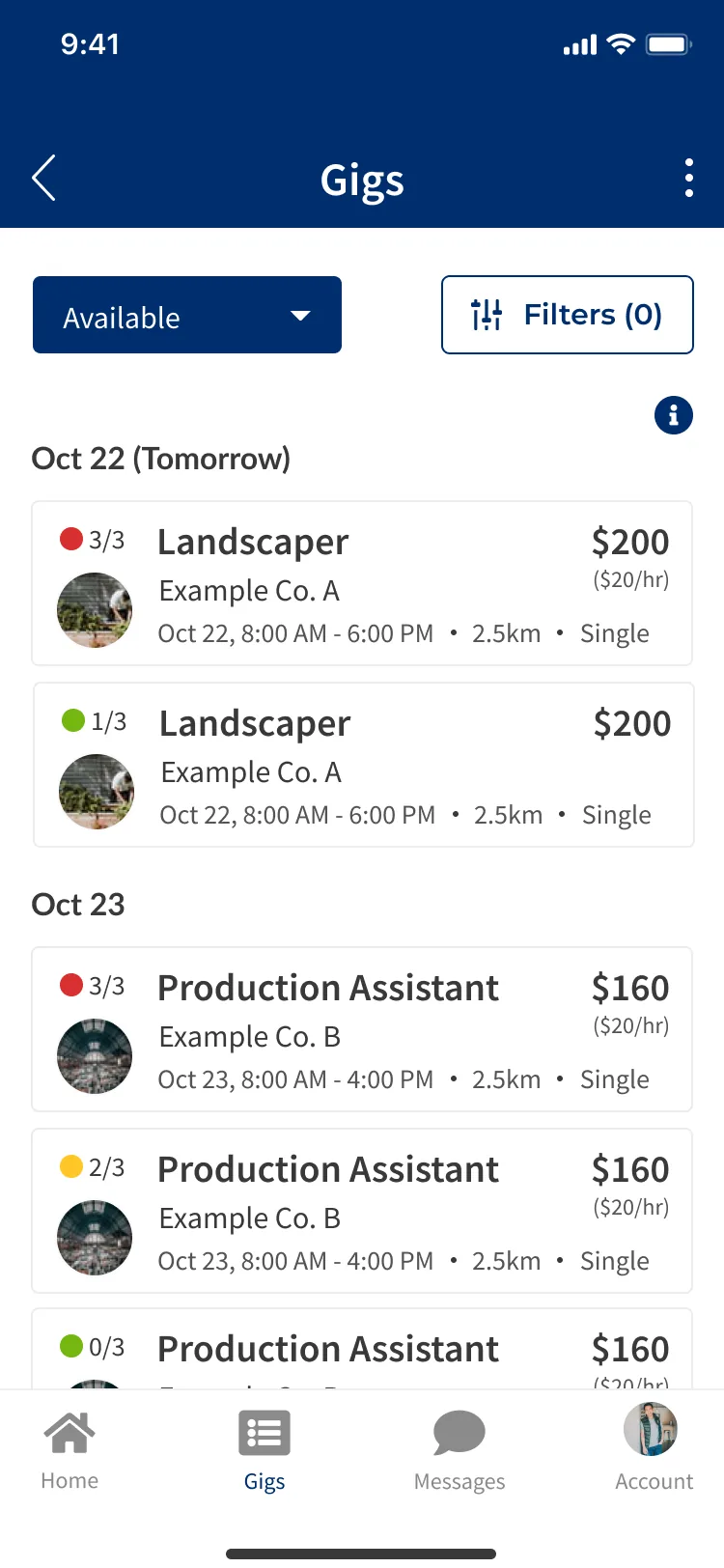
The gig board is where a worker spends most of their time, so every element on a card earns its place. Here is what the screen is telling them.
One control switches the board between available gigs and a worker's own applied, claimed and completed shifts, so the same screen serves discovery and tracking.
The filter panel opens from here, and the count shows how many are active, so a worker always knows how narrowed their board is.
Each gig shows how many worker slots are filled, so a worker can see at a glance whether a shift still needs people before committing to it.
Role, business, date, hours, distance and pay all sit on a single card, enough for a worker to decide without opening it.
Home, Gigs, Messages and Account anchor the whole worker app, so the core of the product is always one tap away.
The look, and why
A confident blue and a dark ink carry the app - the palette the interface itself is built from.
Designing a gig staffing app
What makes a gig staffing app different from a job board?
How do you build trust into short-notice shift work?
How does payment work in a gig marketplace like this?
How long does it take to design a two-sided app like this?
Building a marketplace app with a lifecycle?
Tell us how your business actually runs and we'll tell you honestly what it takes to build - the lifecycle, the vetting, the payouts. No deck, no pitch.