


Book. Train.Track.
The member app for a personal-training studio. Members see their next sessions, book new ones around a trainer's real availability, buy the lesson packages that pay for them, and watch their own body and performance data move over time — all in one German-language app.
A studio that fits in a pocket
Everything a member used to phone the front desk for — booking a slot, buying a block of lessons, checking an invoice, seeing their progress — sits in one German-language app built around the studio's real booking rules.
Booking follows real availability
A session is booked against a specific trainer, day and 15-minute slot, so the app only ever offers times the studio can actually honour.
Lessons are bought in packages
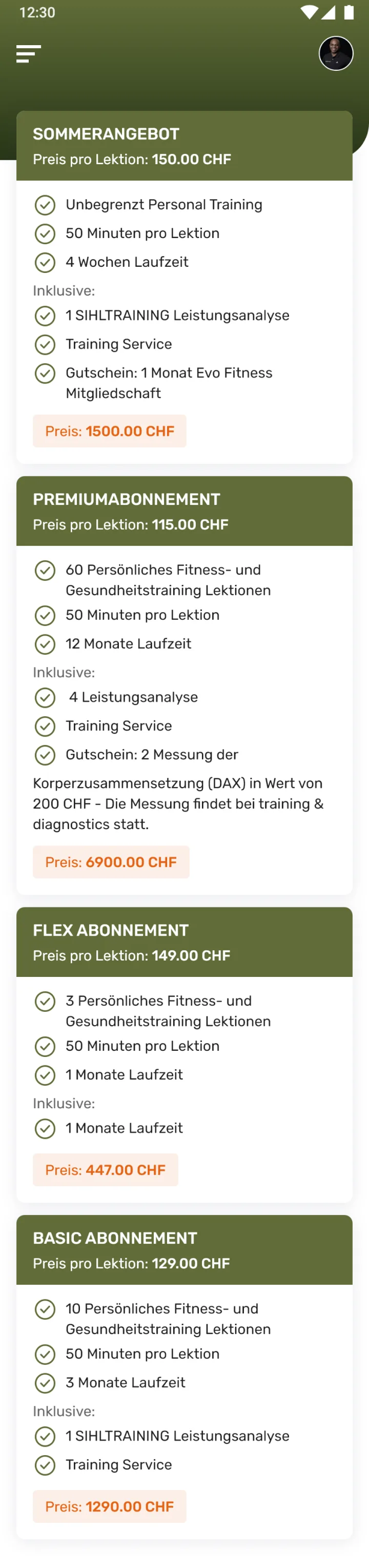
Training is paid for as packages of lessons — each with a per-lesson price, a length and a list of what it includes — rather than one payment at a time.
Progress is measured, not felt
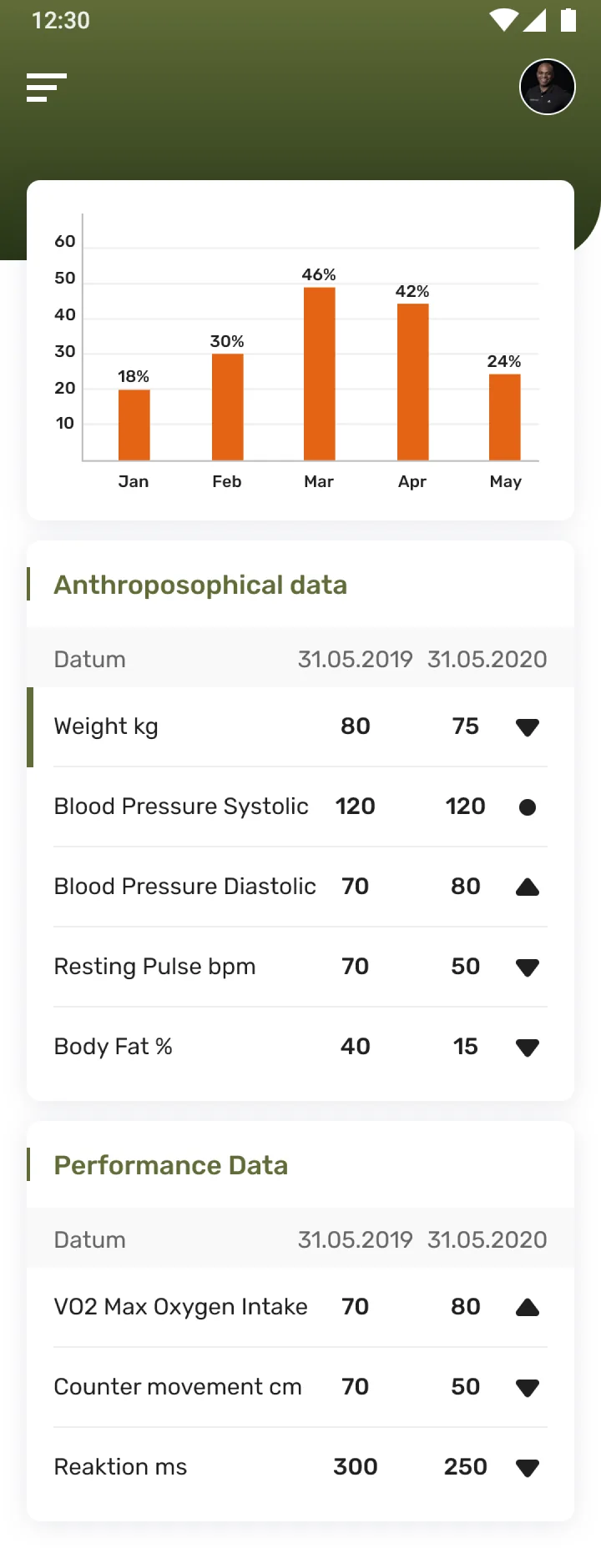
Body-composition and performance metrics are tracked across dates with a trend on each, so a member sees change instead of guessing at it.
Why does a personal-training studio need its own app?
Phone-and-paper booking caps a studio at what its front desk can handle, hides a member's progress, and turns buying more lessons into a conversation. An app removes all three limits.
Every slot booked by call or text is front-desk time, and a double-booking is one distraction away. When lessons are sold ad hoc, a member rarely knows how many they have left or what they were charged.
A member's weight, pulse and performance used to live in a trainer's notebook, not in the member's own hand — so progress was something a trainer described, not something a member could see.
limits phone-and-paper booking puts on a studio — scale, clarity and visible progress.
What Sihl Training had to get right
A booking screen is easy; a booking screen that never offers a time the studio cannot actually honour is not. The work started there and grew outward.
Give the front desk back
- Book against real availability — a trainer, a day and a 15-minute slot.
- Sell lessons as packages with a clear per-lesson price and length.
- Put progress in the member's hand — body and performance metrics with a trend.
- Itemise every invoice, so a member always knows what they paid for.
Why it was hard
- Availability has to reconcile a trainer's real diary down to 15-minute slots.
- Packages and invoices have to stay legible, not just accurate.
- Body-composition data has to read as a trend a member can act on, not a spreadsheet.
- The whole app — copy, dates, currency — had to be German-first from the start, not translated after.
What does the app look like in the hand?
The screens a studio member moves through, from their next session to the numbers behind it.
Home & next sessions
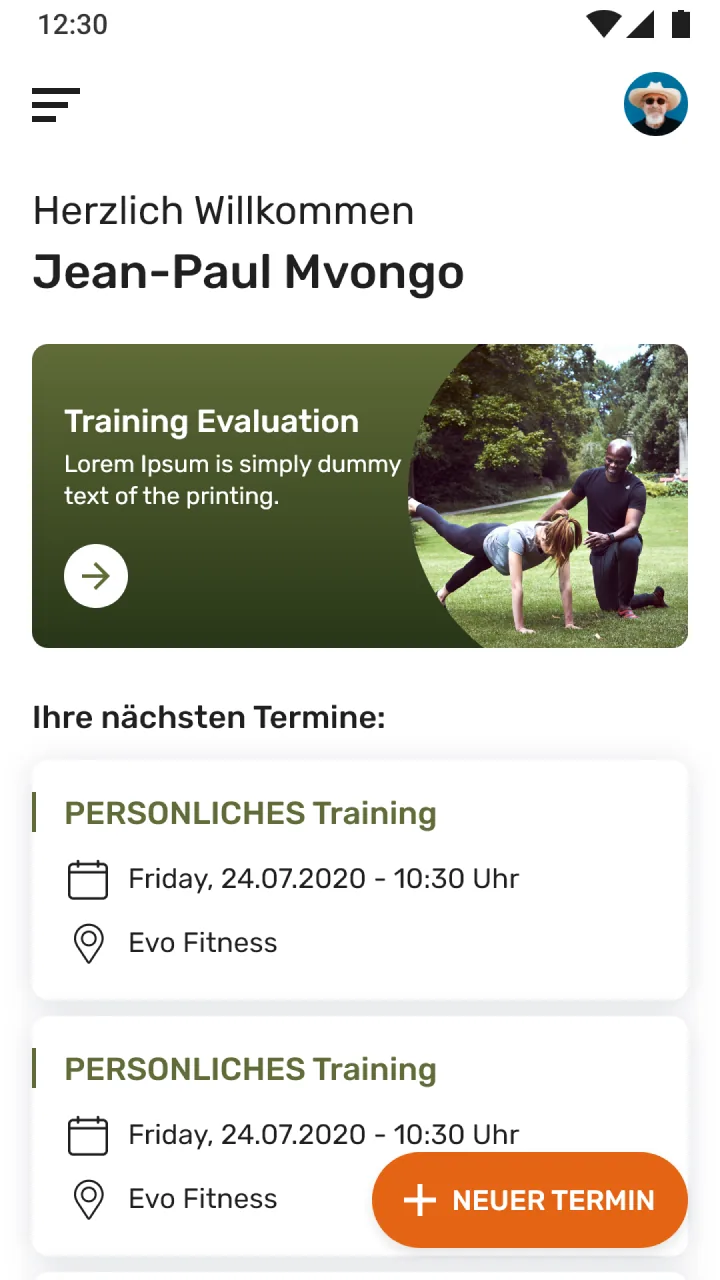
01 · HomeA welcome, the member's upcoming personal-training appointments with date and location, and a shortcut to book a new one.
Book a session
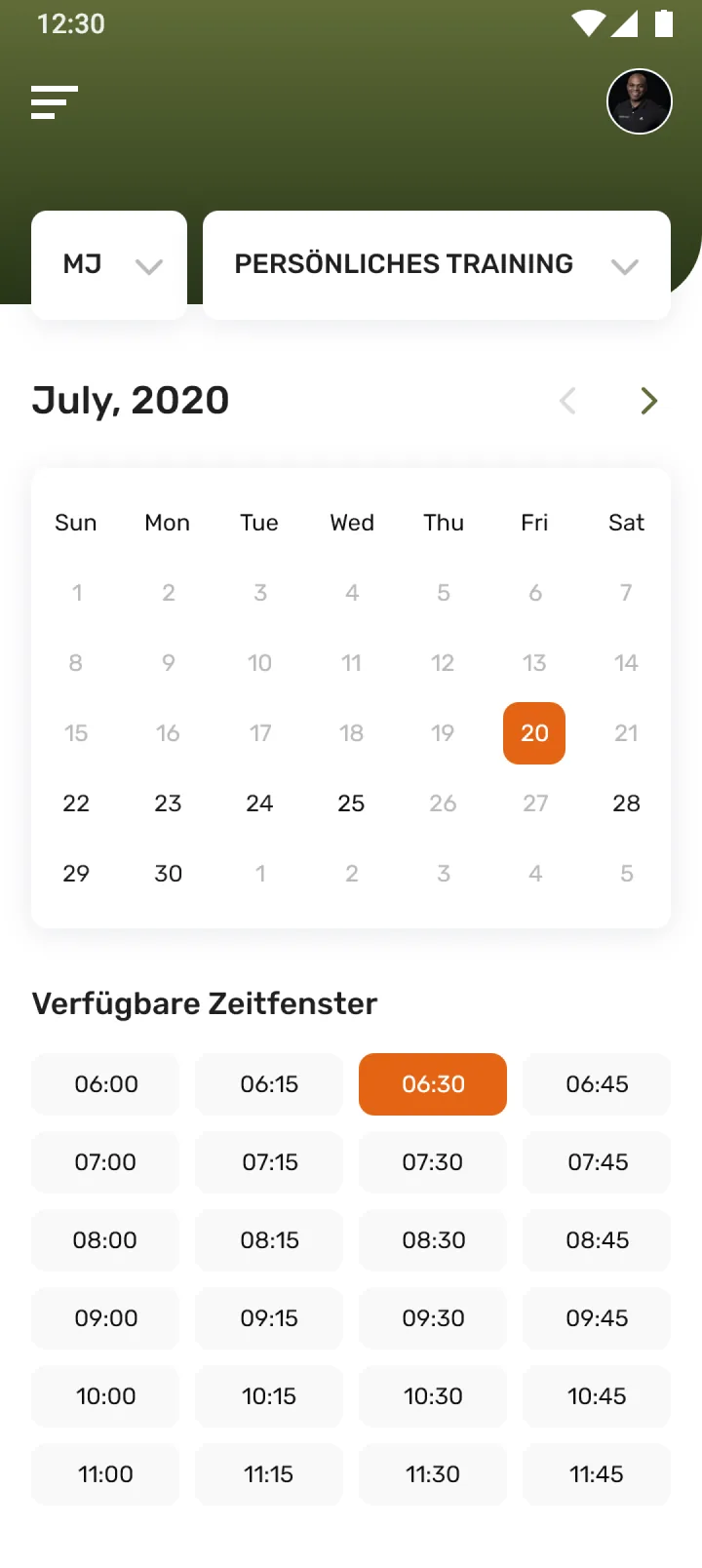
02 · CalendarPick a trainer and training type, choose a day, then tap an available 15-minute time slot.
Buy a package
03 · CreditsTraining packages laid out side by side — per-lesson price, lesson count, duration and what each one includes.
Track your body
04 · PerformanceBody-composition and performance metrics recorded over time, each with a trend against the last measurement.
After a session
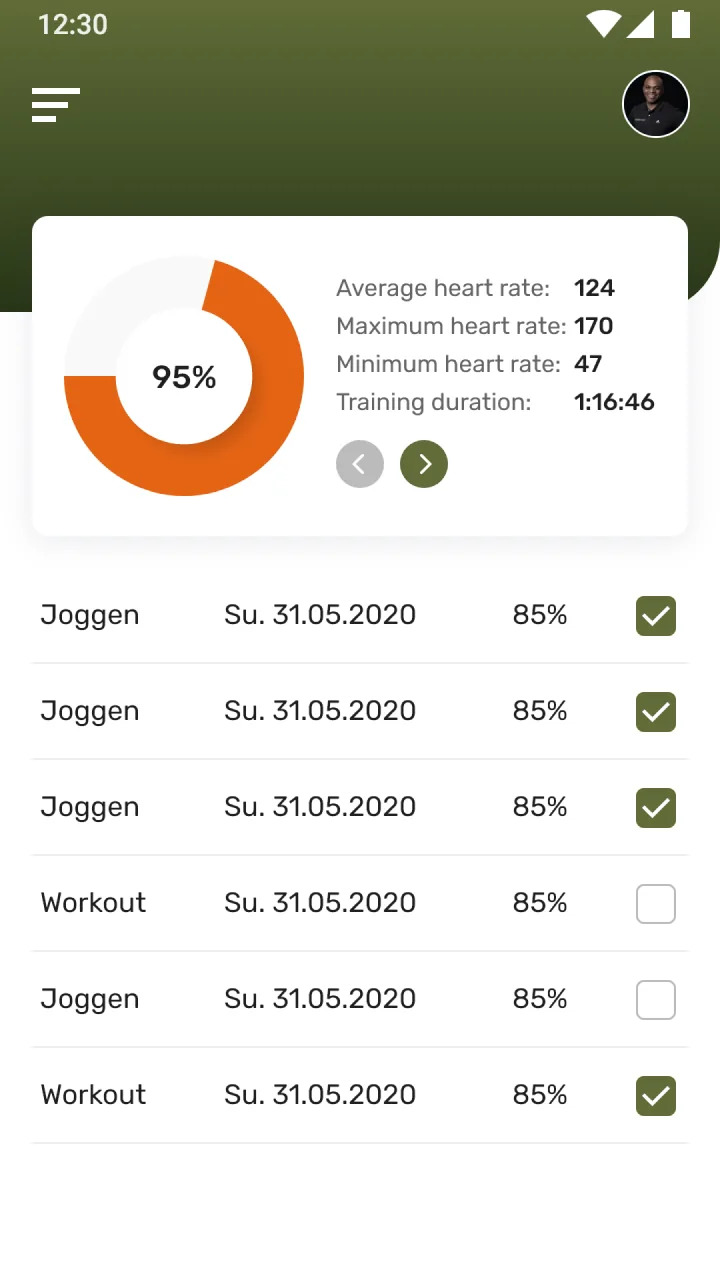
05 · RatingA completed session summarised with its heart-rate range and duration, above a log of past trainings.
Invoices
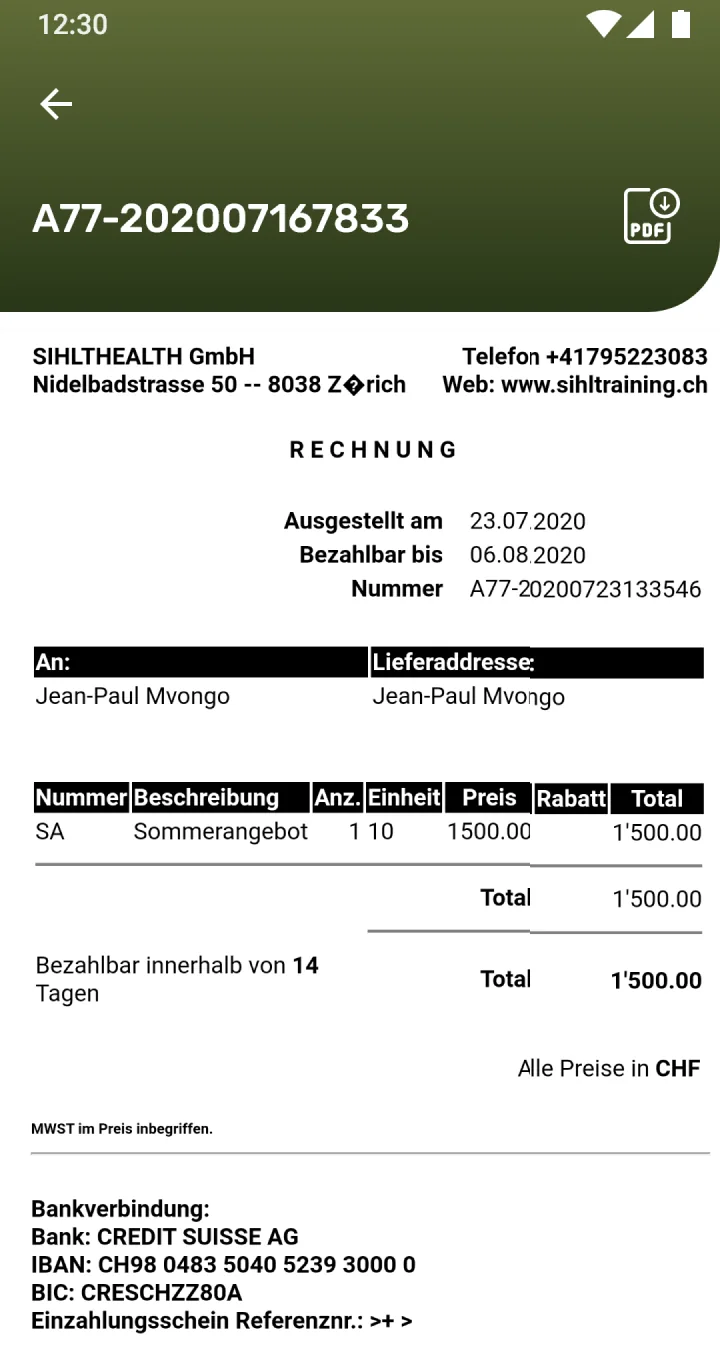
06 · InvoiceEach booking's charges itemised, so a member can see exactly what they paid for.
Profile & account
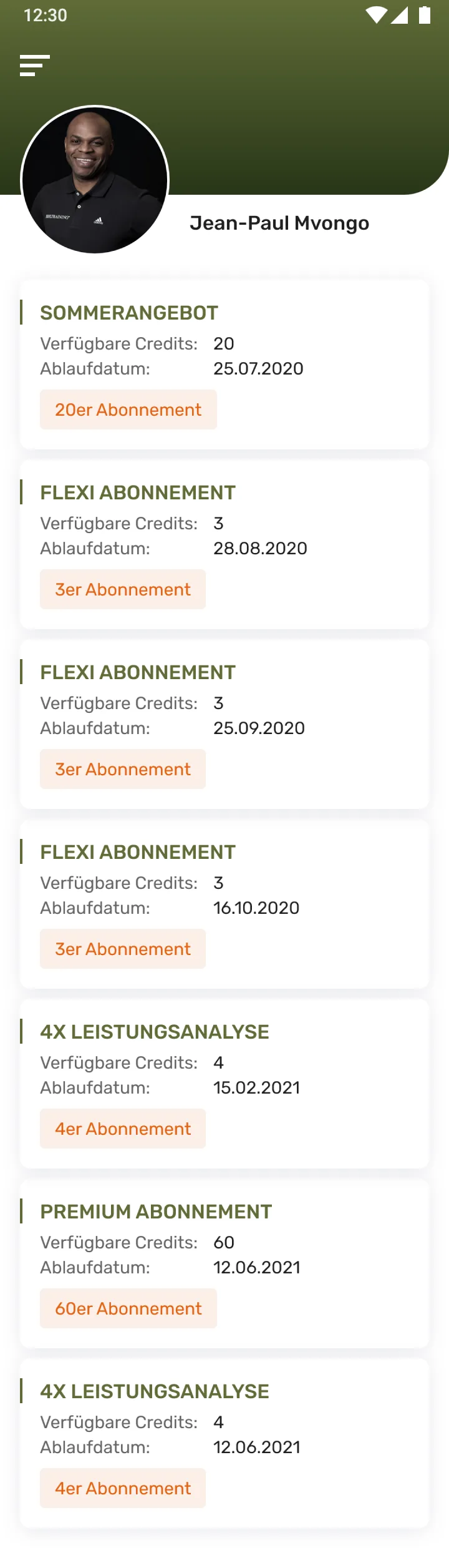
07 · ProfileThe member's account details and settings for the studio app.
How does a member book a session?
Booking is the screen the whole app hangs off. This is that screen as it renders — select a pin to see how a session is put together.
A member chooses which trainer to book with from the studio's roster, so availability shown next is that trainer's own.
The session type is selected up front — personal training and the studio's other formats — because it changes the length and the slots on offer.
Stepping forward or back a month finds the week the member wants without scrolling a long list of dates.
Available days respond and past or closed days are greyed out, so a member can only ever pick a date the studio can actually take.
Available 15-minute slots are laid out in a grid; tapping one puts together the booking for that trainer, day and time in a single move.
The session, then the trend behind it
Progress shows up two ways in the app: right after a session, and built up over weeks. Switch between them — one search, two views of the same idea.
Built for a German-speaking studio from day one.
Copy, dates and Swiss-franc pricing were designed for the studio's own members from the start, not translated afterwards from an English original.
The scope, in one panel
Every number in this panel is delivered scope — what was designed, built and handed over on the fitness & personal training build for Sihl Training. It leaves out traffic, conversion and revenue on purpose: those figures belong to the client, and we don’t publish numbers we cannot stand behind.
- Category
- Fitness & personal training
- Audience
- Studio members
- Market
- SwitzerlandGerman-language
- What we did
- UX & UI designApp front-end
The look, and why
A grounded, outdoors-adjacent palette — a confident orange marks bookings and actions against an olive-and-ink base, kept calm enough to read body data at a glance.
What does a booking-first studio app need to get right?
These came out of building a booking app around one studio's real rules. They hold for any business that books time against a real, limited resource.
Model the real constraint first
The whole app hangs off booking working correctly, so start from the studio's actual trainers, days and slot length, not an idealised calendar.
Make pricing legible before checkout
A per-lesson price, a length and what's included have to be comparable at a glance, or buying stays a phone conversation.
Give data back to the person it's about
Metrics a provider keeps in a notebook should sit in the user's own hand, with a trend, not just a number.
Localise from day one, not after
Copy, dates and currency built for the real market from the start avoid the seams a later translation pass always leaves.
Building a fitness booking app
How does a fitness booking app work?
Can members buy training packages in the app?
Does it track fitness progress?
Is the app available in German?
How long does it take to build an app like this?
Have a business that still books over the phone?
Tell us how your business actually works and we'll tell you honestly what it takes to build — the booking rules, the packages, the data. No deck, no pitch.