


The paddock,on the record.
A precision-agriculture advisory: a public site and a grower portal where every field visit becomes an investigation report, a dated crop recommendation and a gross-margin the farmer can act on.
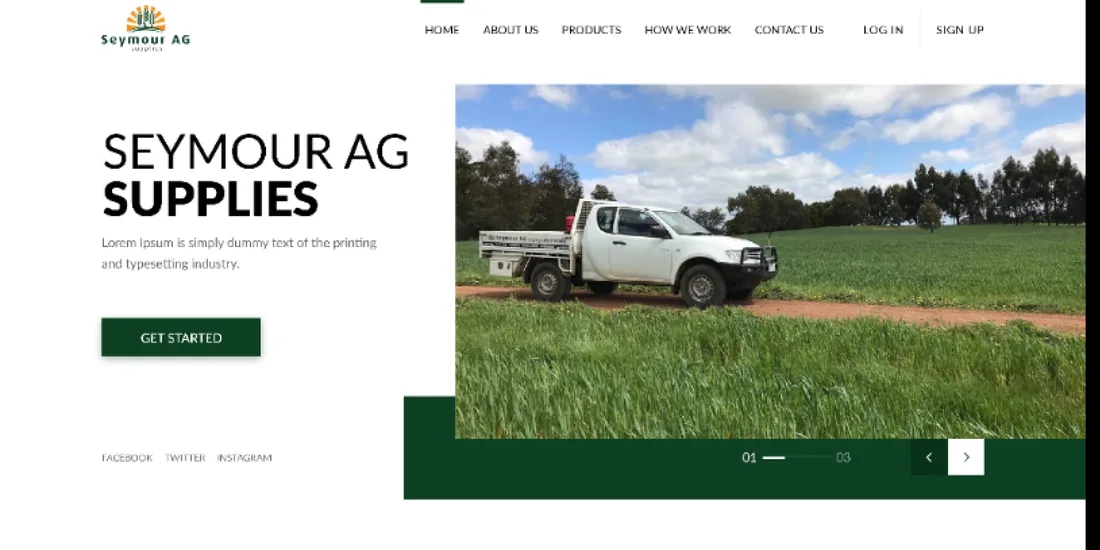
What is Seymour AG?
A crop consultant walks a paddock, notes what is growing and what is wrong with it, and hands back a spray plan. Seymour AG turns that visit into structured, dated reports a grower can open, download and price out from their own dashboard.
Reports by paddock, over time
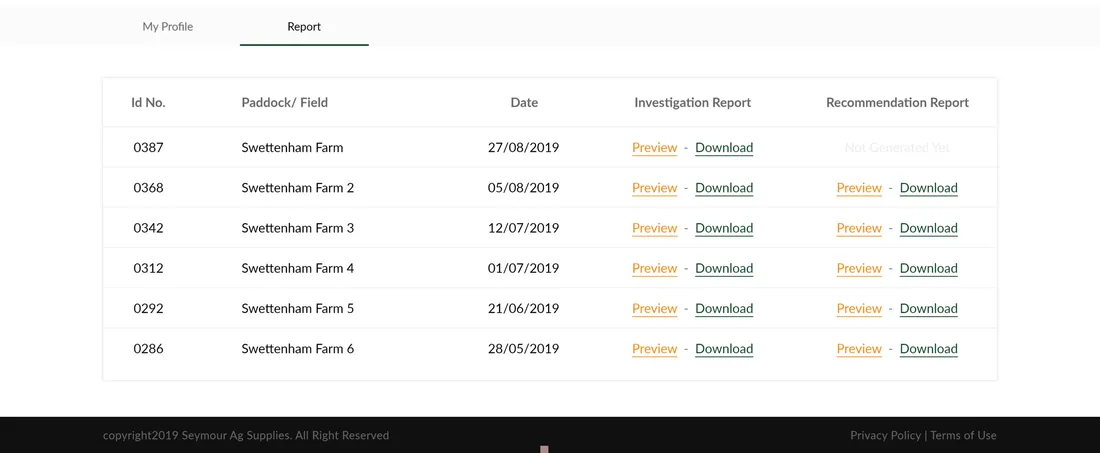
The dashboard lists every field visit by paddock and date, with an investigation report and a recommendation report against each — and shows plainly when a recommendation has not been generated yet.
Preview or download, per report
Each report can be read on screen or pulled down as a document, so the grower keeps a portable record and the agronomist keeps the source of truth.
Advice a grower can cost
A gross-margin report sits alongside the agronomy, turning yield, seed, fertiliser, chemical and contract costs into a per-hectare margin, so a recommendation is judged on money, not just agronomy.
Why does agronomy advice need more than a PDF? A crop recommendation is only useful if it is specific, current and costed.
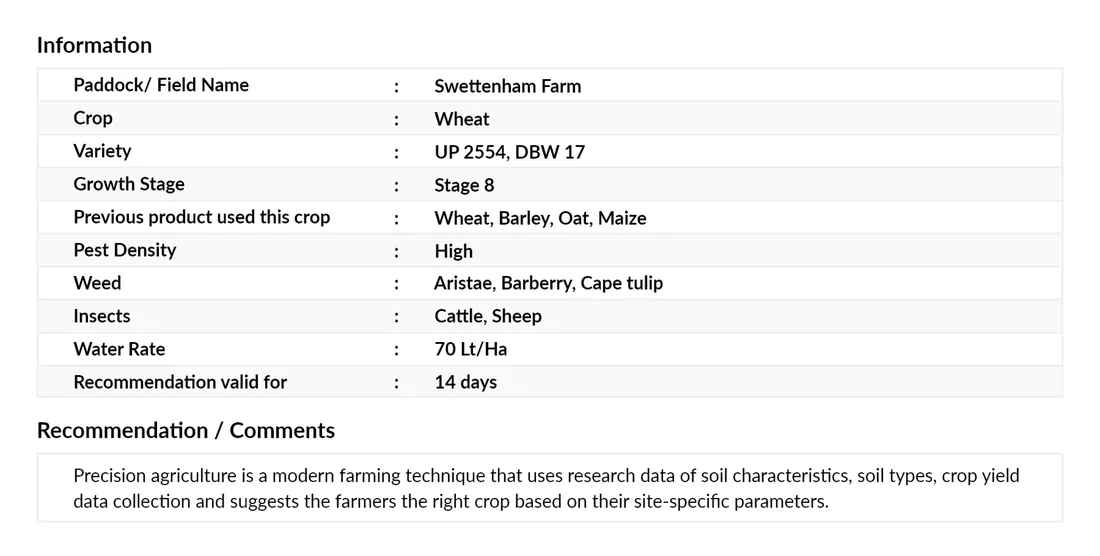
The field has to be captured, precisely. Crop, variety, growth stage, pest density, weeds, insects and water rate are the inputs a recommendation is built on — lose them and the advice turns generic. Answer → a structured investigation report that keeps them attached to the field.
A recommendation expires. A spray plan is valid for a set window and no longer, and applying it blind weeks later is exactly the failure mode a document invites. Answer → the recommendation report carries its own validity and the exact conditions it assumes.
The advice has a price. Every input on a recommendation costs money per hectare, and an emailed PDF never tells a grower what following it will cost. Answer → a gross-margin report totalling costs against expected yield income.
things break when a recommendation lives in an emailed document — the field context, the expiry date and the cost of following it.
Seymour AG
A public face and a private portal, sharing one job
The marketing site explains how the advisory works and lets a grower sign up; the portal is where the value lands. Behind a login, each paddock accumulates a run of reports over the season rather than a folder of loose PDFs.
Turn a field visit into a costed record
- Capture the field precisely. Crop, variety, growth stage, pest density, weeds, insects and water rate, on the record.
- Give every recommendation an expiry. Validity and the exact spray conditions it assumes, not advice applied blind.
- Cost the advice. A gross-margin report turns the recommendation into a per-hectare number.
- Keep a season of reports by paddock. Not a folder of loose PDFs.
Why it was hard
- A crop recommendation is only useful if it is specific, current and costed — three separate things to get right at once.
- The field context has to travel with the recommendation, or the advice becomes generic.
- A spray plan is valid for a set window; nothing in a plain document enforces that.
- The cost of following advice is normally a separate guess, disconnected from the agronomy itself.
Who is Seymour AG built for?
A public face and a private portal, sharing one job — agronomist and grower, either side of the same report.
The agronomist
Walks the paddock, notes crop, variety, growth stage, pest density, weeds, insects and water rate, and writes the dated recommendation those notes support.
The grower
Signs up on the public site, then opens a dashboard behind login listing every visit by paddock and date, each report ready to preview or download.
What is on a crop recommendation?
A single recommendation report carries everything an operator needs to act, and the value is in how much sits on one page — the field it describes, the conditions it assumes, and the exact chemistry with rates.
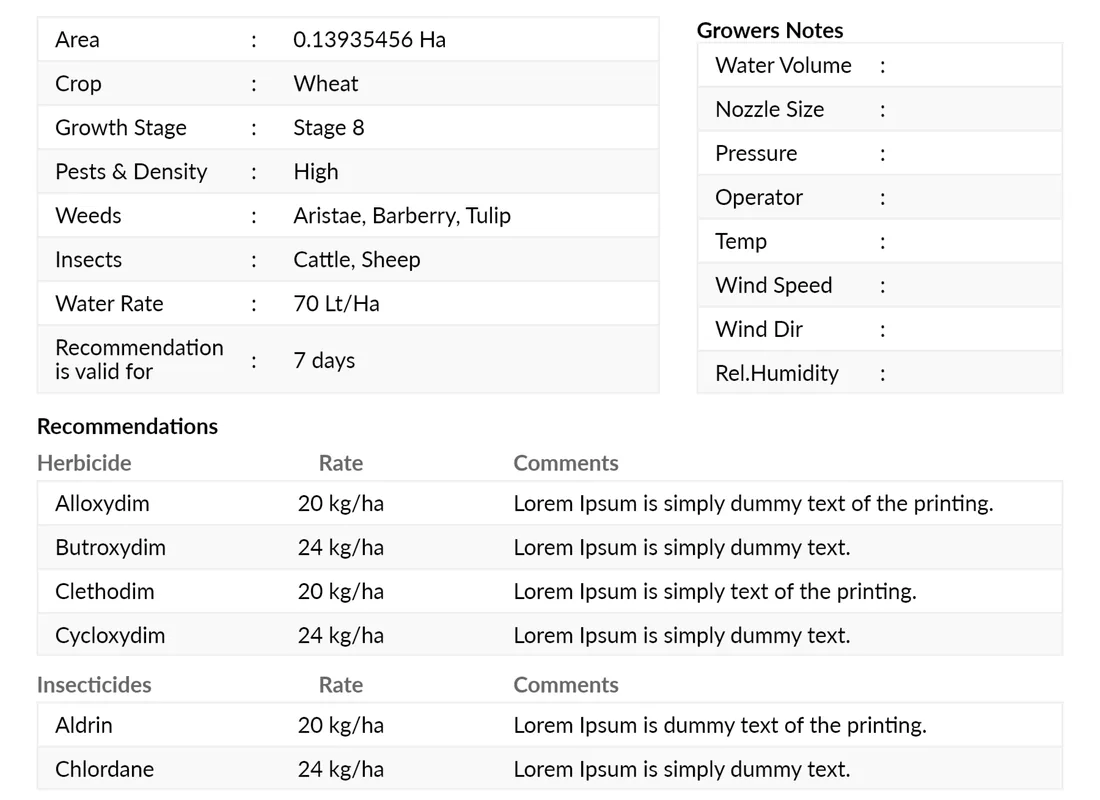
Area, crop, growth stage, pest density, weeds, insects and water rate — the same field inputs carried through from the investigation, so the recommendation is anchored to a real paddock.
Grower's notes fix the spray conditions — water volume, nozzle size, pressure, operator, temperature, wind speed and direction, humidity — so the plan is only applied when the weather matches.
The report states how many days the recommendation is valid for, so nobody sprays on advice that has aged out of the growth stage it was written for.
Each recommended herbicide carries its own application rate and a comment, so the operator mixes to a number rather than a memory.
Insect control sits under the same structure with its own rates, so one report covers the whole intervention rather than splitting it across documents.
How does a field visit become paid-for advice?
The real lifecycle behind every report — from the agronomist walking the paddock to the grower opening the record on their own dashboard.
- 01Agronomist
Walk the paddock
A crop consultant walks the paddock and notes what is growing and what is wrong with it — crop, variety, growth stage, pest density, weeds, insects and water rate.
- 02Portal
File the investigation report
The field inputs become a structured, dated investigation report, so the context stays attached to the paddock instead of separating from it.
- 03Agronomist
Write the recommendation
A dated crop recommendation carries its own validity window and the exact spray conditions it assumes — nozzle, pressure, wind, humidity.
- 04Portal
Cost it with a gross margin
Seed, fertiliser, chemical and contract costs are totalled against expected yield income into a per-hectare margin.
- 05Grower
Open it on the dashboard
The grower's dashboard lists every visit by paddock and date, each report ready to preview or download.
The scope, in one panel
Every number in this panel is delivered scope — what was designed, built and handed over on the agriculture & agronomy build for Seymour AG. It leaves out traffic, conversion and revenue on purpose: those figures belong to the client, and we don’t publish numbers we cannot stand behind.
- Industry
- Agriculture & agronomyPrecision advisory
- Two surfaces
- Public siteGrower portal
- What we did
- UI/UX, web designFront-end
- Deliverables
- Field & recommendationMargin reports
The look, and why
A grounded, agricultural system — a working forest green carries the advisory, against a soft mist wash that keeps dense field data and report tables legible.
What does a client reporting portal need to get right?
These principles came out of building Seymour AG and hold for any advisory business that turns fieldwork into a report a client acts on.
Capture the field, not just the crop
Lose the growth stage, pest density or water rate and the advice turns generic — the inputs are what make it specific.
Give every recommendation an expiry
A spray plan is only valid for a window; the report has to say so, or it gets applied blind weeks later.
Cost the advice, not just the agronomy
A recommendation without a gross margin asks a grower to trust the science and guess the money.
Keep a season of reports by paddock
A run of dated reports per paddock beats a folder of loose PDFs a grower has to sort through by memory.
Preview first, download when it matters
A grower reads on screen most of the time; the document only needs to exist for the moment it has to travel.
Read every report as a data model
A paper report becomes a real product once its fields are decomposed into a structured record, not a free-text scan.
Building an agronomy advisory portal
How long does it take to build a client reporting portal?
Can a marketing site and a client portal be one project?
How do you turn paper reports into a digital product?
How much does a platform like this cost?
Turning specialist reports into a product growers use?
Tell us what your reports look like and we'll tell you honestly what it takes to build — the fields, the validity, the margin. No deck, no pitch.