


Booked, staffed,billed.
A salon platform with two front doors. Customers move through a guided, category-to-payment booking flow; owners run appointments, staff, services, products and invoicing from a single back office.
Two front doors onto one salon
The customer app and the owner console are designed as separate products sharing one schedule. A booking a customer makes lands directly in the owner's appointments, and the same visit closes out as an itemised invoice — so the diary and the till are never two different systems.
Booking is a guided path, not a form
Customers pick a service category, drill into a specific treatment, choose a stylist, then a date and time — one decision per screen, with a running cost and duration.
Owners get a real console
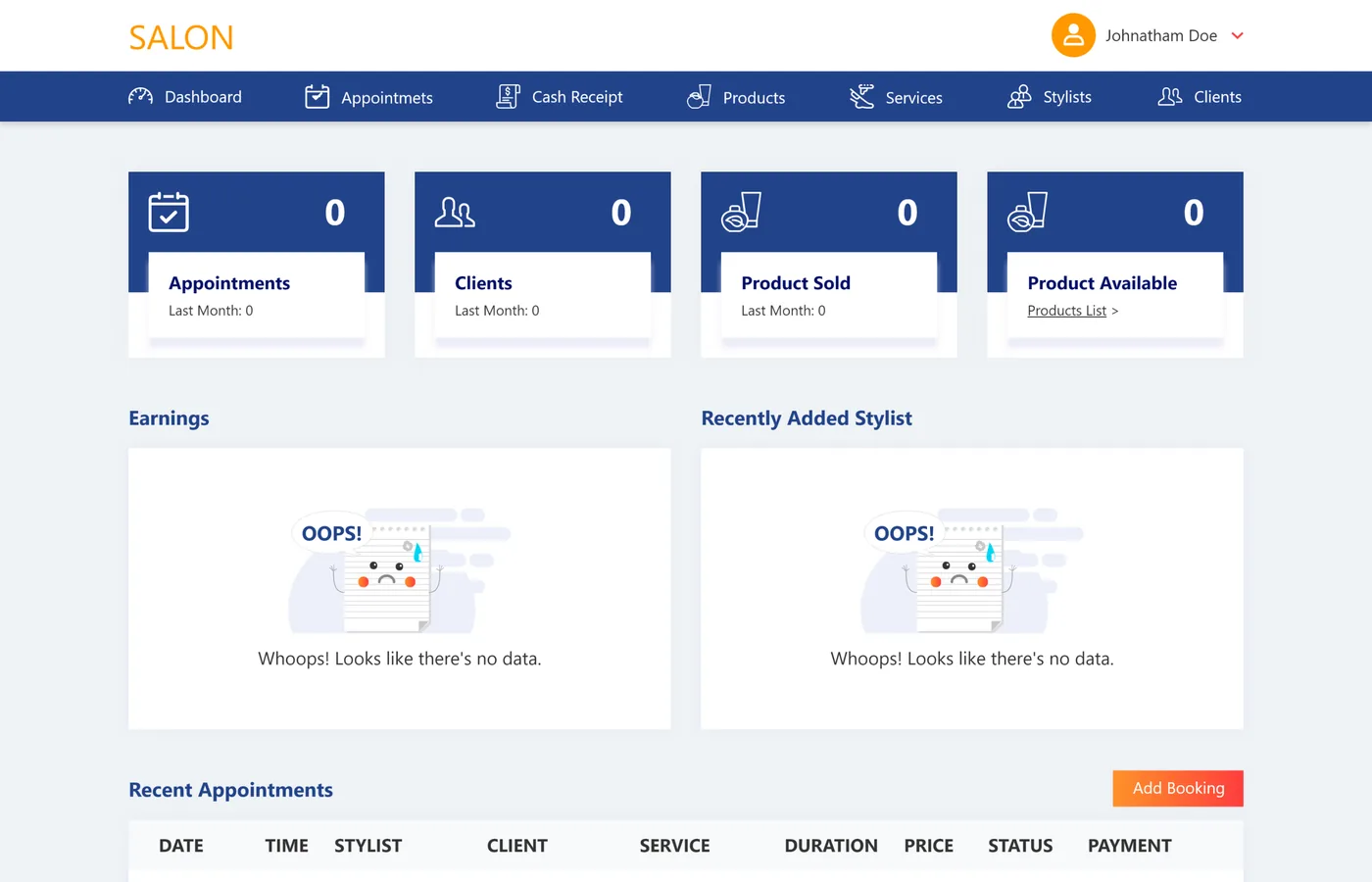
Seven modules — dashboard, appointments, cash receipt, products, services, stylists and clients — cover the whole front-of-house operation rather than just a calendar.
Every visit closes as an invoice
The cash-receipt module builds an itemised bill of products and services, applies tax and records how it was paid, so takings reconcile against the day's appointments.
Why does salon booking resist off-the-shelf tools?
A generic calendar app books a slot and stops. A salon needs the slot, the stylist, the service catalogue behind it, the products sold alongside it, and a receipt at the end — held together for two audiences who never see the same screen.
Choosing a treatment is a decision tree — services nest under categories and sub-categories, vary by who they're for, and each carries its own duration and price. Answer → a guided, one-decision-per-screen booking flow.
Staff and schedule are the same problem — a stylist has hours, a rate and a set of services they perform, and booking the treatment without booking the person makes the calendar lie. Answer → the stylist is part of every slot.
The money is products plus services plus tax — a visit is rarely one line, and the owner needs the receipt attached to the appointment, not a spreadsheet. Answer → an itemised invoice builder on the same record.
What the Salon platform had to bring together
A booking has to carry the slot, the stylist and the service catalogue behind it; the back office has to run the whole front-of-house operation from the same schedule.
One schedule, both sides
- Walk the customer through the choice — category, service, stylist, date and time, one decision per screen.
- Give owners a real console — seven modules covering the whole front-of-house operation.
- Close every visit as an invoice — products and services, tax applied, payment recorded.
- Keep the diary and the till in sync — a booking a customer makes lands directly in the owner's appointments.
Why it was hard
- Services nest under categories and sub-categories, vary by who they're for, and each carries its own duration and price.
- A stylist has hours, a rate and a set of services they perform — the calendar lies if booking ignores it.
- A visit is retail products plus timed services plus tax, on one receipt.
- Two audiences — customers and owners — never see the same screen, but have to share one schedule.
Who is the Salon platform built for?
Two audiences share one schedule — 3 roles — a customer booking a treatment, a stylist working the chair, and an owner running the business.
The customer
Moves through a guided path — category, service, stylist, date and time — with a running cost and duration, then pays and confirms.
The stylist
Carries hours, a rate and the services they perform, so a booking is never made against someone who isn't actually free.
The owner
Runs dashboard, appointments, cash receipt, products, services, stylists and clients — seven modules covering the whole front-of-house operation.
What changes when the diary becomes software
What a front desk actually gains when the booking, the stylist and the receipt share one schedule.
What do the two sides look like?
The customer-facing booking screens and the owner's back-office console, side by side. Every screen below is a real surface in the platform.
The day at a glance
Owner consoleAppointment, client and product counts across the top, earnings and recent bookings below — the owner's landing view.
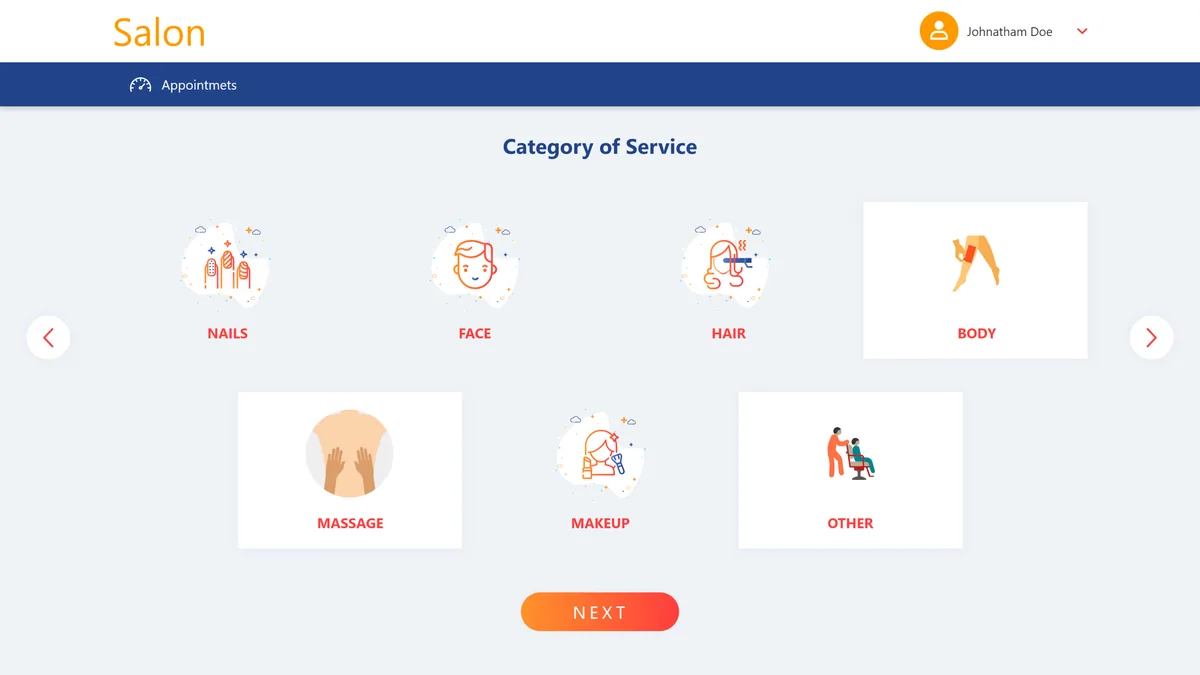
Start with a service category
Booking step 1Illustrated cards for nails, face, hair, body, massage, makeup and other open the guided booking flow.
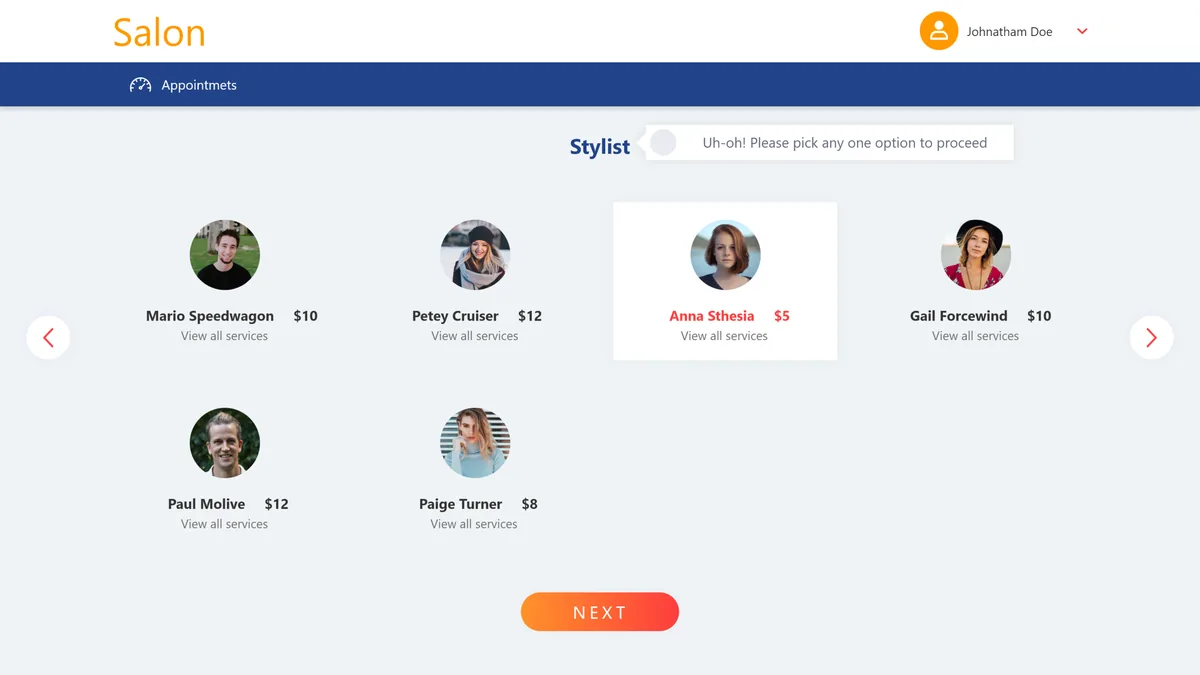
Choose who does the work
Booking step 2Stylists are shown with their photo, rate and a link to the services they perform.
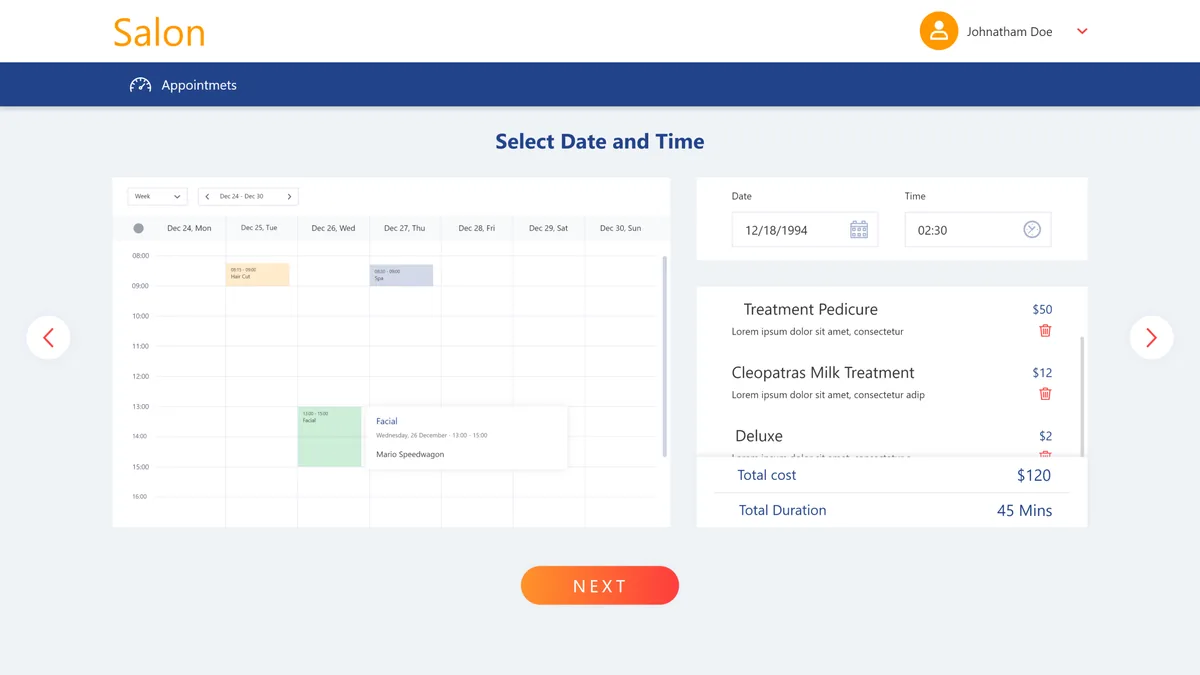
A calendar, not a text field
Booking step 3A weekly calendar shows existing bookings while a summary panel keeps the running cost and total duration.
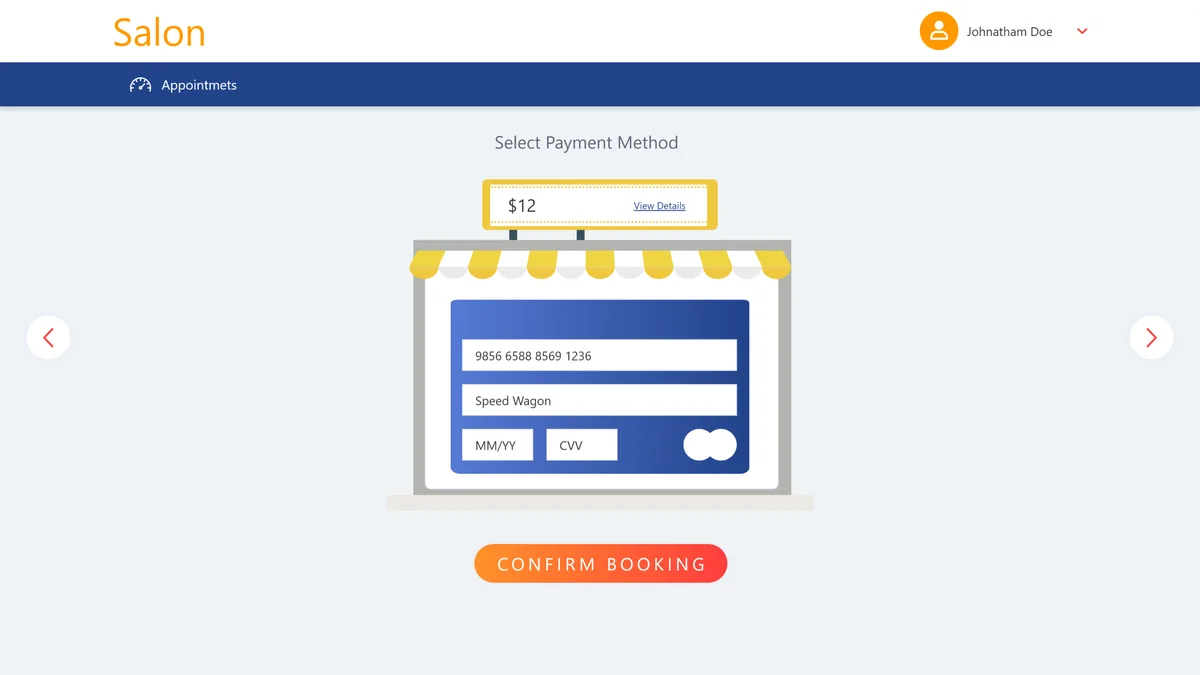
Pay and confirm
Booking step 4The customer picks a payment method, enters card details and confirms the booking in one screen.
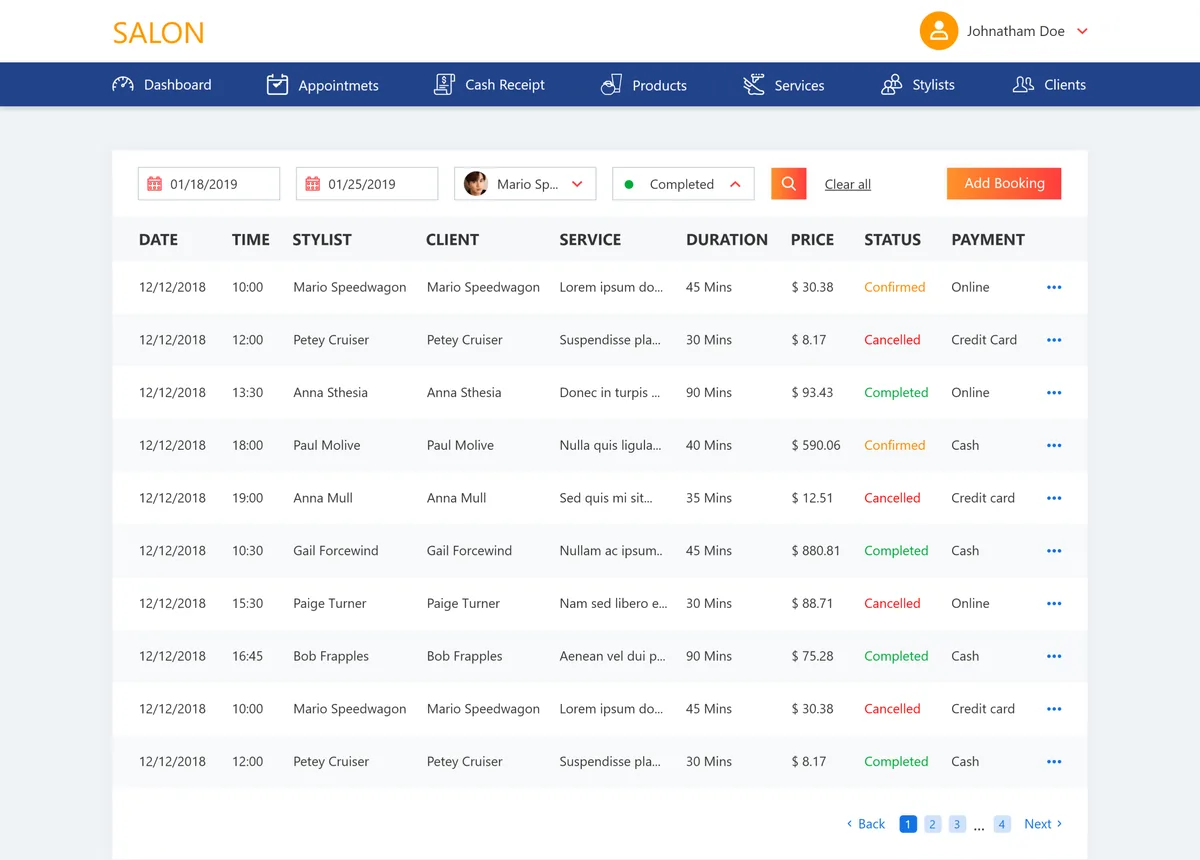
Every booking, filterable
Owner consoleThe owner filters appointments by date range, stylist and status, with each row colour-coded confirmed, completed or cancelled.
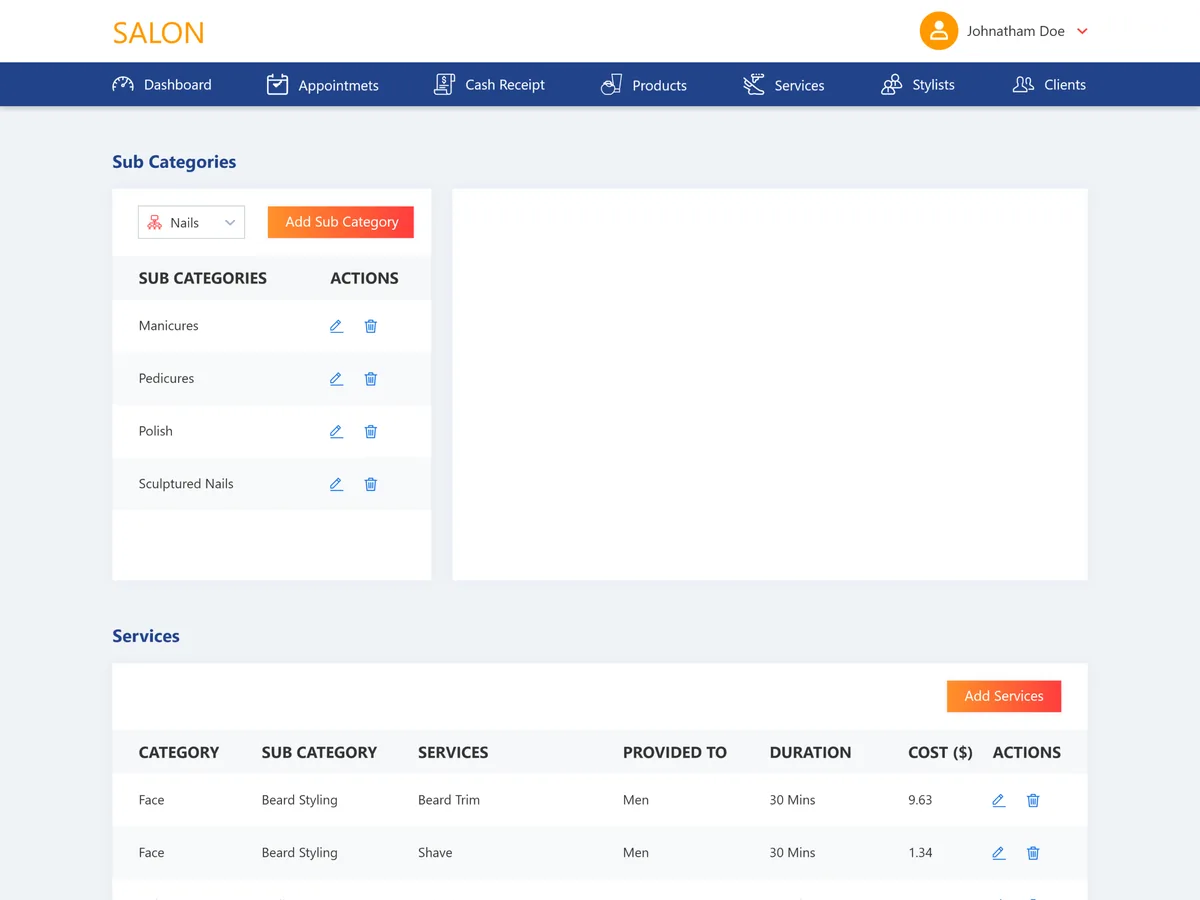
The catalogue behind the booking
Owner consoleCategories and sub-categories on the left; services with who they are for, duration and cost on the right.
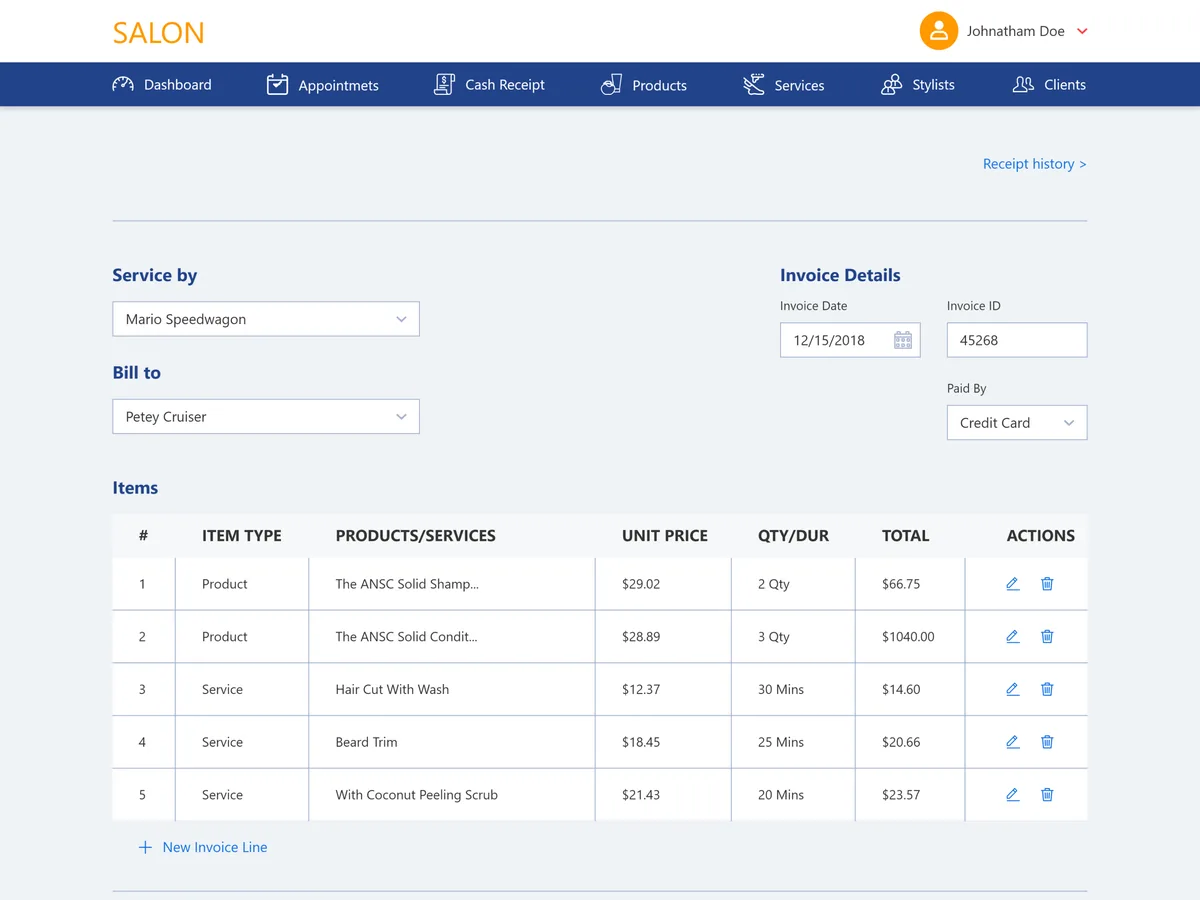
Turn a visit into a receipt
Owner consoleThe cash-receipt builder lines up products and services with unit price, quantity or duration, applies tax and records paid-by.
How does a customer book, end to end?
The whole argument for the platform is that one guided path on the customer side becomes a scheduled appointment and a receipt on the owner side — the two audiences are working on the same visit from opposite ends.
- 01Customer
Choose a category
The customer starts from a service category — nails, face, hair, body, massage, makeup or other.
- 02Customer
Pick a service & stylist
They drill into a specific treatment, then choose the stylist who performs it, each with a price.
- 03Customer
Select date & time
A weekly calendar shows what is open; the running total and duration update as they go.
- 04Customer
Pay & confirm
The customer chooses a payment method, enters card details and confirms the booking.
- 05Salon
Lands in the console
The confirmed appointment appears in the owner's schedule with its stylist, service and status.
- 06Salon
Closes as an invoice
At checkout the visit becomes an itemised receipt of products and services with tax applied.
The scope, in one panel
Every number in this panel is delivered scope — what was designed, built and handed over on the beauty & salon build for Salon. It leaves out traffic, conversion and revenue on purpose: those figures belong to the client, and we don’t publish numbers we cannot stand behind.
- Sector
- Beauty & salonAppointments
- Audiences
- Customers · StylistsSalon owners
- Platform
- Web platformGuided booking + console
- Our work
- Product designWeb app design
The rest of the back office
The tables and catalogue that keep the front desk and the till reading the same day.
Every booking, filterable. Date range, stylist and status, colour-coded confirmed, completed or cancelled.
The catalogue behind the booking. Categories and sub-categories on the left; duration and cost on the right, editable by the owner.
The look, and why
A confident orange carries the booking flow, a deep blue anchors the owner console, and a clean geometric sans keeps a dense back office legible.
What does a salon booking platform actually need?
Six things separate a salon system a business will run its whole day on from a calendar it abandons after a fortnight. They came out of building this one and hold well beyond it.
A guided booking, not a form
Services nest under categories and vary by person and duration, so the booking has to walk the customer through the choice one decision at a time.
The stylist is part of the slot
Booking a treatment without booking who performs it, and at what rate, produces a calendar nobody trusts.
An editable service catalogue
Prices, durations and who a treatment is for change constantly; the owner has to change them without a developer.
Billing that mixes products and services
A visit is retail plus timed work plus tax on one receipt, attached to the appointment it belongs to.
One schedule, two audiences
A customer booking and an owner's diary must be the same underlying appointment, not two systems kept in sync by hand.
The day, filterable
Appointments by date, by stylist and by status is how a busy front desk actually reads its own diary.
Building a salon booking & management platform
How long does it take to build a salon booking platform?
Can customers and staff use the same system?
Does it handle billing and invoices, or just bookings?
Can the salon manage its own services and staff?
Can a platform like this be built for my salon?
Running a salon on a diary and a card machine?
Tell us how your business actually works and we'll tell you honestly what it takes to build — the booking flow, the console, the billing. No deck, no pitch.