Case study · Safety Wagon

Buy it.Book the fitter.

A mobile app that sells CCTV and security equipment and schedules the on-site installation in the same journey, then keeps the wallet, plans and every booking together for the customer, the company and the technician.
Mobile appCommerce + servicesBooking & scheduling
Safety Wagon screenSafety Wagon screen
What Safety Wagon does
5 product categoriesBook installation in-appWallet, COD & online payAMC & membership plansReferral rewards
01 — The product

One app for the camera and the crew who fits it

Safety Wagon puts a security-equipment shop and an installation-booking service behind a single account. A customer browses cameras, alarms and safety gear, then books the technician to mount them without leaving the app, so the purchase and the job stay attached to each other.

Shop and service, one toggle

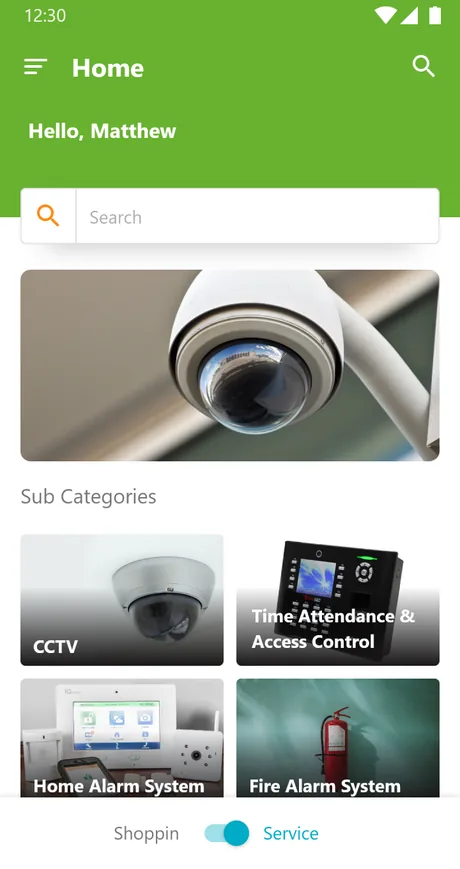
The home screen switches between Shopping and Service, so the same catalogue that sells a camera also books its installation.

Organised around security

Products sit under CCTV surveillance, home and office security, fire and safety categories, filtered by brand and price.

Wallet, coupons and referrals

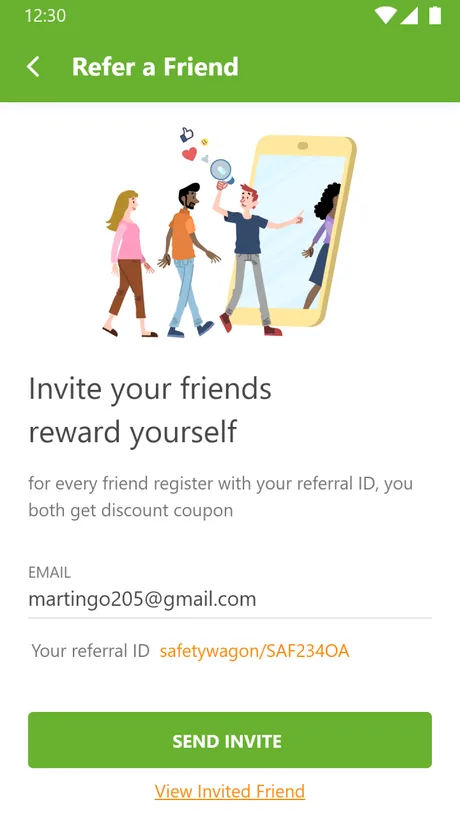
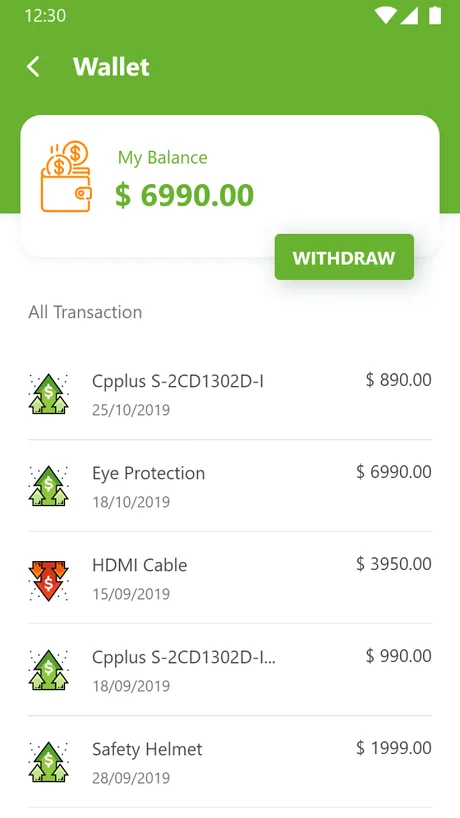
Every account carries a wallet with transaction history, promocode discounts at checkout and a referral ID that rewards both sides.

02 — The problem

Why buying security gear rarely ends at checkout

A camera is only useful once it is mounted, wired and pointed at the right door. Ordinary shopping apps sell the box and stop there, leaving the customer to find a fitter, agree a time and chase the result on their own.

Three gaps had to close: the order is only half the job without installation attached to it, scheduling the fitter belongs inside the app rather than a phone call afterwards, and without one record of the order, the visit and the payment, after-sales cover turns into a paper chase.

03 — Goals & challenges

What Safety Wagon had to hold together

A shopping app and a booking app usually ship as two products. Safety Wagon had to be one account that carries both without either side feeling bolted on.

Goals

The purchase and the job, one record

  • One toggle, two catalogues. Shopping and Service on the same home screen, not two separate apps.
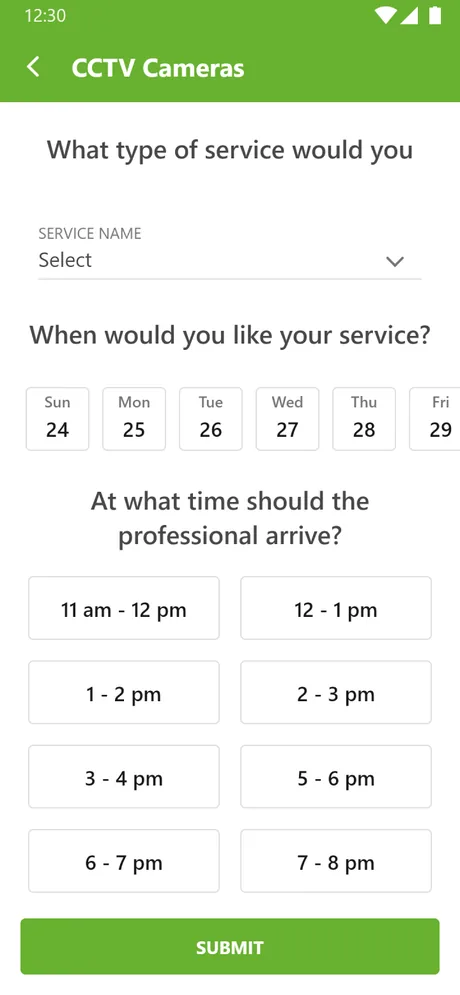
  • Book installation in the purchase flow. Units, date and arrival window captured in-app.
  • Track status, not guess it. Every order and request moves from pending to accepted.
  • Keep the relationship going. A stored wallet, AMC plans and referrals beyond the first sale.
Challenges

Why it was hard

  • Selling the hardware without arranging the installation leaves the hardest part to the customer.
  • Choosing how many cameras, a date and an arrival window belongs inside the same app, not in a phone call afterwards.
  • Without one place holding the order, the visit and the payment, after-sales cover turns into a paper chase.
  • A broad catalogue of brands, categories and price points still has to narrow to one shortlist fast.
05 — Buy it, book it, done

From browsing to a finished install

Customer
01

Browse the catalogue

CCTV, home and office security, and fire-safety gear, filtered by category, brand and price.

Browse
Customer
02

Book the installation

Choose the units, the date and an arrival window in the same flow as the purchase.

Book
System
03

Track the status

The request moves from pending to accepted, visible on the booking record.

Track
Technician
04

Fit it on site

The installation happens in the booked window, against the same record the purchase created.

Install
Customer
05

Pay and rate

Settle from the wallet, cash on delivery or online, then rate the job once it's done.

Done

keep scrolling — the deal glides left →

06 — Beyond the purchase

What keeps a customer coming back?

The purchase and the install are the core loop. A wallet, membership plans and referrals are what keep a customer inside the app afterwards.
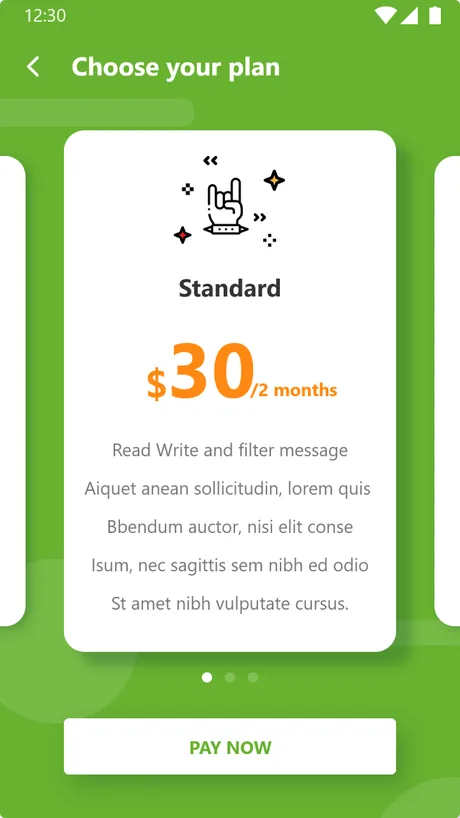
Wallet & paymentsMembership & AMCRefer a friend

Wallet & payments

3 pay routes

A stored wallet with full history, cash on delivery and online payment, plus promocode discounts at checkout.

Membership & AMC

Tiered plans

Annual maintenance contracts and membership tiers a customer can choose and pay for from the app.

Refer a friend

Referral IDs

A personal referral ID that hands a discount coupon to both the inviter and the friend who joins.

04 — On the phone

Every surface, in the hand

The app was designed screen by screen for a phone, from the first category tap through to a scheduled installation and the wallet that pays for it.

Home
App preview
01 • Home

Search, a featured banner and the security sub-categories, with the shop-or-service toggle at the foot.
Product
App preview
02 • Product detail

A single unit with its specification, imagery and the choices a buyer makes before adding to cart.
Filters
App preview
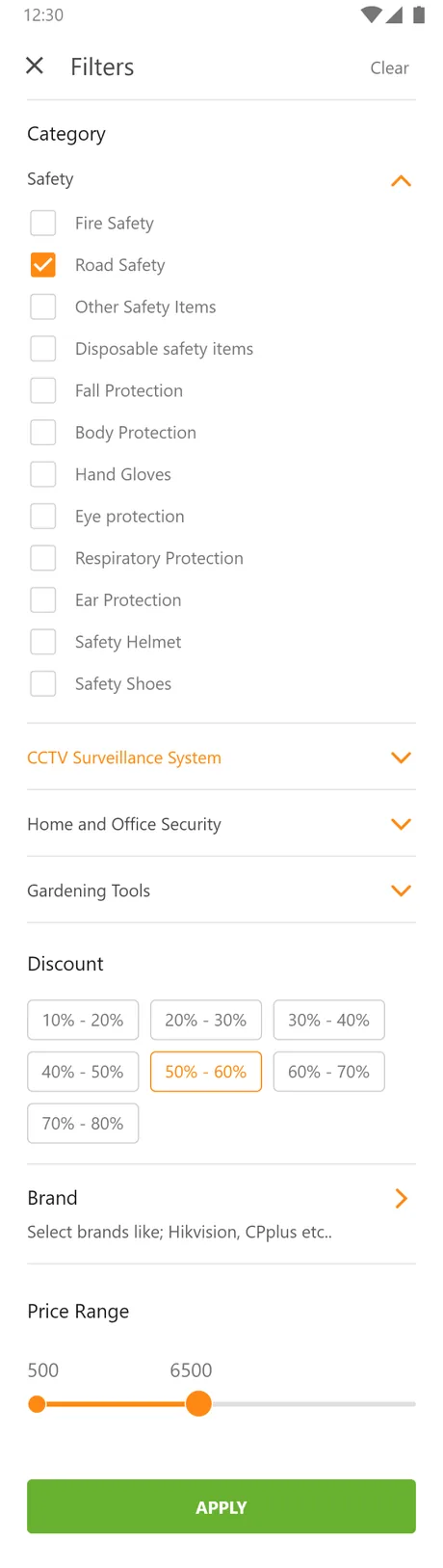
03 • Filters

Category, brand and a discount and price-range filter narrow a broad catalogue down to one shortlist.

Book
App preview
04 • Book a service

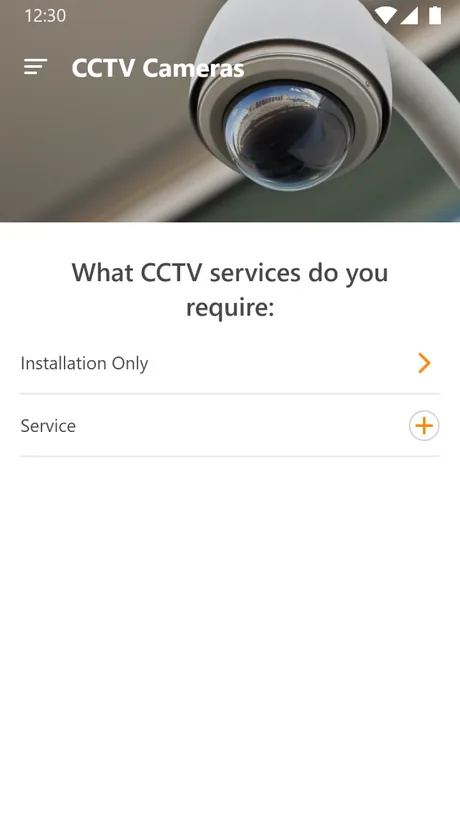
Choose the service, the day and the arrival window, then submit the installation request.
Bookings
App preview
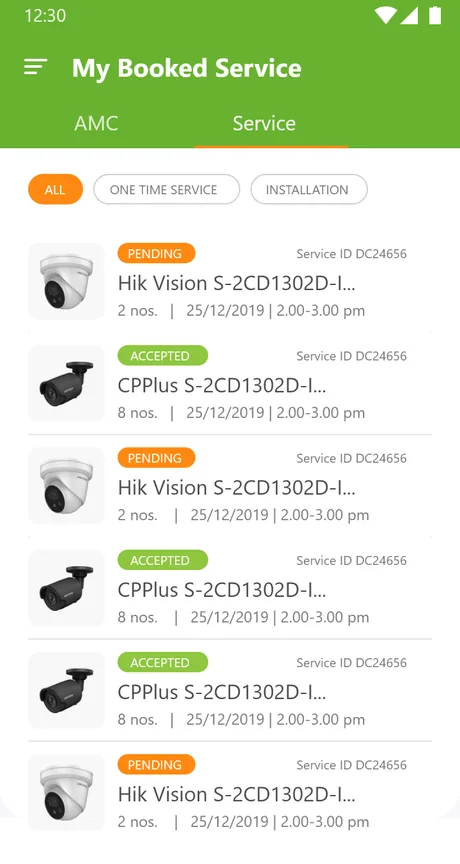
05 • My bookings

One-time, installation and AMC jobs listed with a live status chip on each.
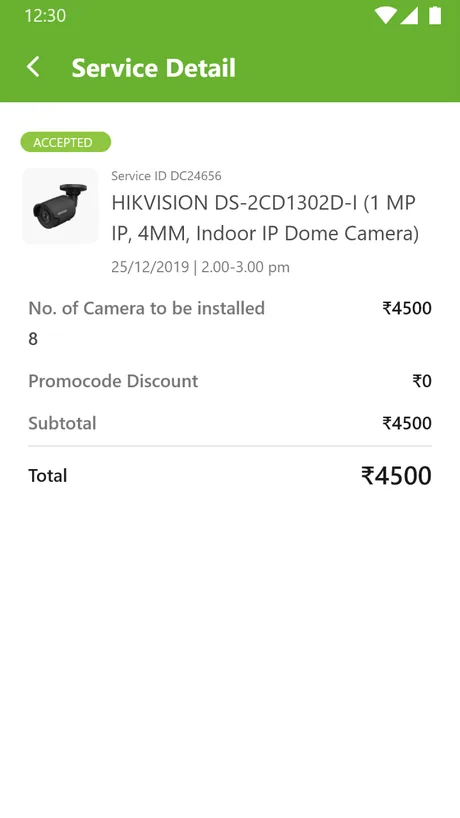
Detail
App preview
06 • Service detail

The full breakdown of a booked job: cameras to install, schedule, discount and total.

Wallet
App preview
07 • Wallet

A running balance, every credit and debit, and a withdraw request.
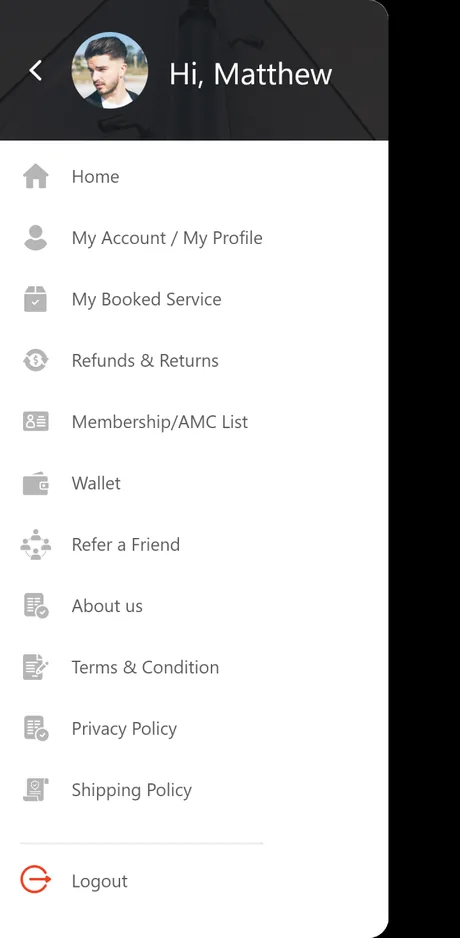
Menu
App preview
08 • Navigation

The side drawer ties the shop, bookings, wallet, membership and referrals into one menu.

07 — Visual design

The look, and why

A confident safety green carries the brand across both the shop and the service side, staying legible against dense product specs and a live booking status chip.

Colour
Safety green
#5BA524
Deep green
#3C7A12
Ink
#1F2C13
Body
#54605A
Mist
#F4F8EE
Line
#E4EBDB
Typography
Display · 700Buy it. Book the fitter.
HeadingThe order is only half
Body · InterA technician arrives in the booked window and completes the install.
Label · MonoSHOP · SERVICE · WALLET
FAQ

Building a security commerce and booking app

How long does it take to build a commerce app with service booking?
A shopping app that also books an on-site service is a larger build than a plain store, because the catalogue, the cart, the booking flow and a wallet all have to share one account. A first release at Safety Wagon's shape typically runs a few months, phased so the shop and checkout ship before membership and referral extras.
Can one app sell products and schedule installation?
Yes, and Safety Wagon is built around exactly that. The home screen toggles between Shopping and Service, the booking flow captures how many units, the date and an arrival window, and the request stays attached to the order so the purchase and the installation are never tracked in two places.
What payment options does the app support?
Checkout offers a stored in-app wallet with full transaction history, cash on delivery and online payment, and promocode discounts apply against the subtotal. The wallet also holds referral and refund credit and supports a withdraw request, so a customer can pay from balance or top up as needed.
Does it handle after-sales cover and repeat customers?
It does. Annual maintenance contracts and tiered membership plans are sold inside the app, bookings are grouped into one-time, installation and AMC, and a referral ID rewards both the customer and the friend they invite, which keeps returning buyers close to the service that supports them.
Let's build

Selling something that also needs installing?

Tell us how the purchase and the job actually connect and we'll tell you honestly what it takes to build both into one app. No deck, no pitch.