


Contracts, compliance & cash
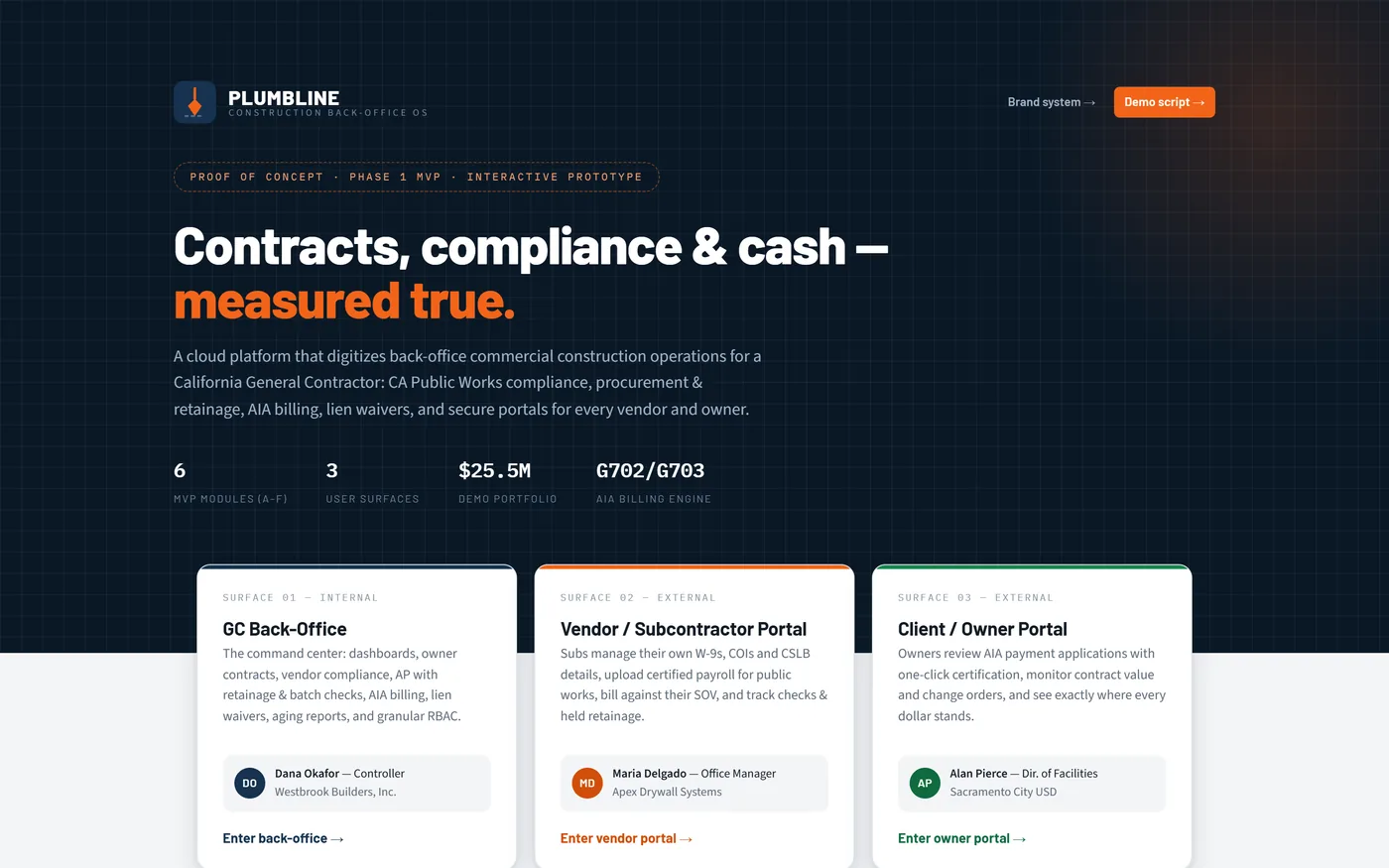
A back-office platform for a California commercial general contractor: public works compliance, procurement and retainage, AIA billing, lien waivers, and a portal for every vendor and owner.
Sector
- Commercial construction
- California public works
Platform
- Cloud back office
- Two external portals
What we did
- Product modelling
- UX + UI design
- Front-end engineering
Surfaces
- GC back-office
- Vendor portal
- Owner portal
What problem is it modelled on?
A commercial general contractor doing public works in California carries obligations that ordinary accounting software does not understand. Plumbline handles that reality end to end.
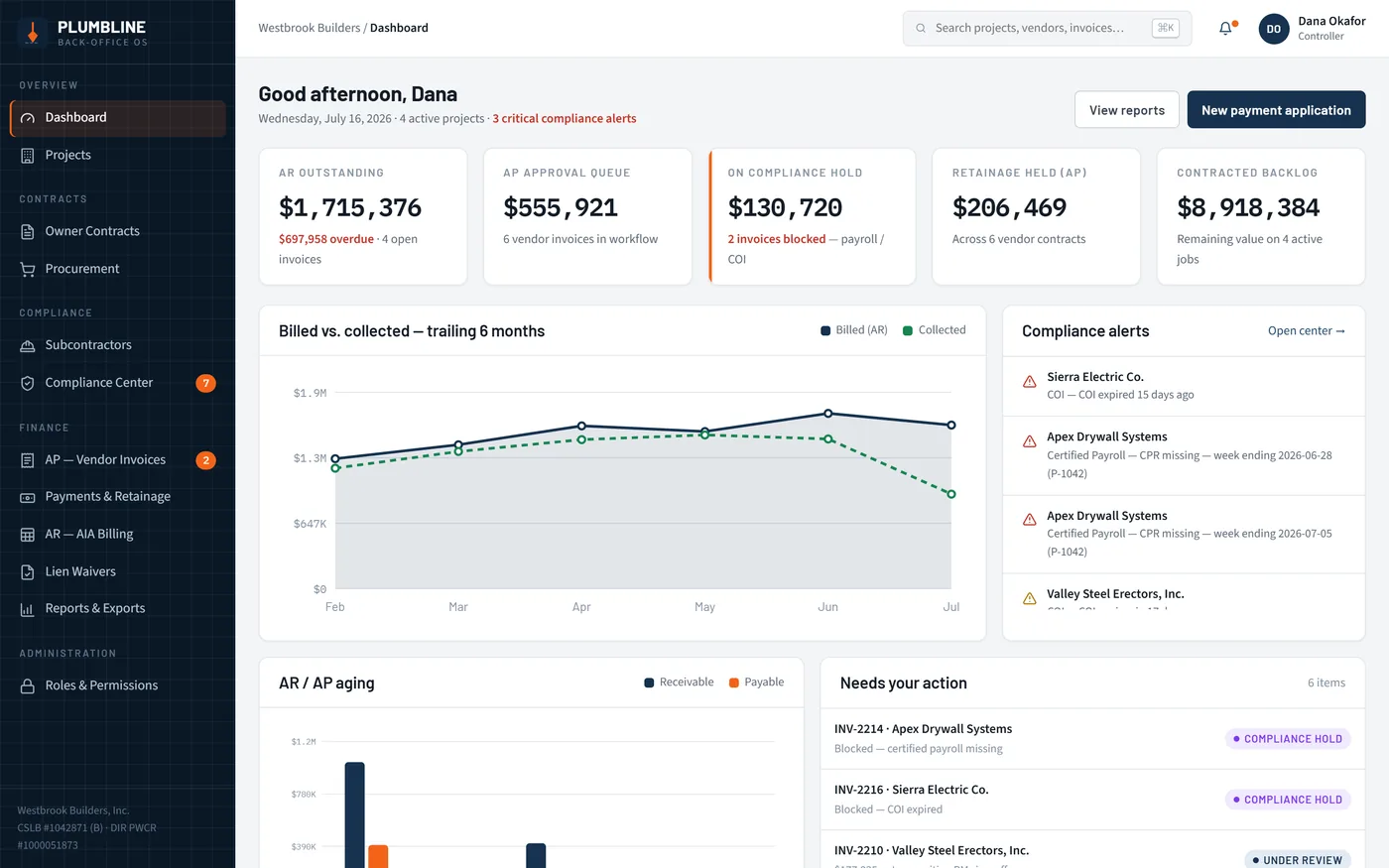
One console for three very different audiences
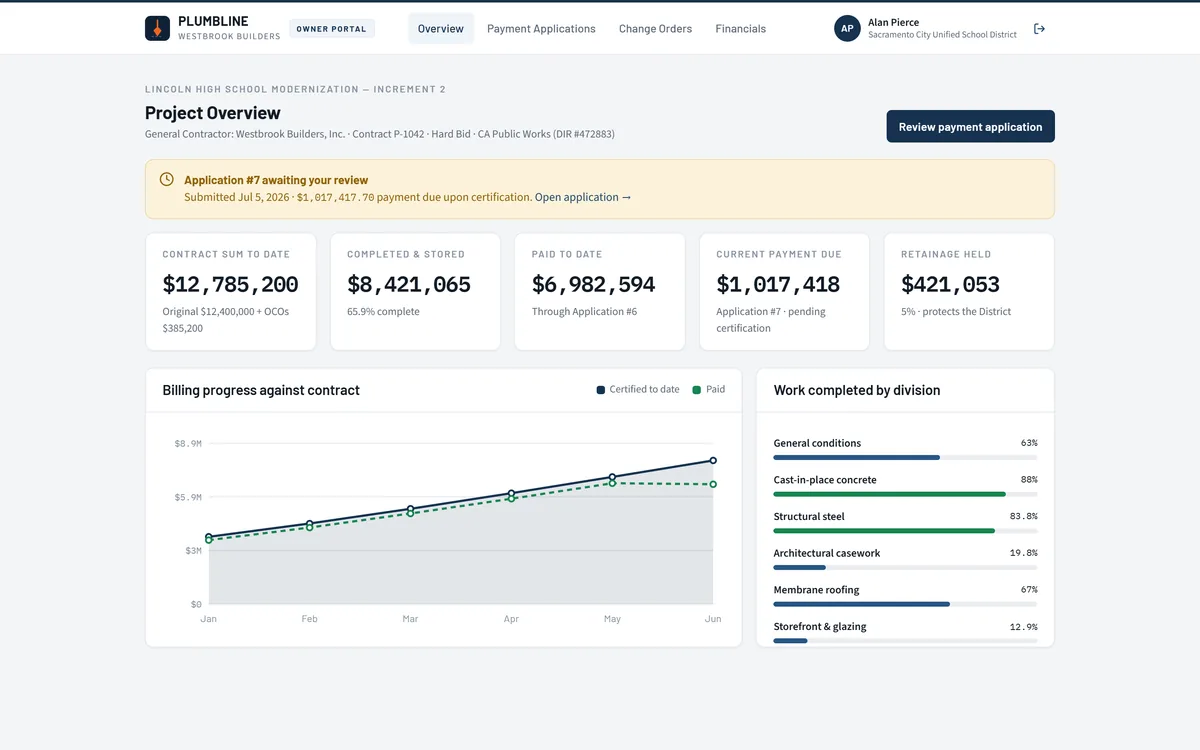
The back office is the command centre. Subcontractors and owners get their own fenced-off portals rather than emailed spreadsheets, so the documents that gate a payment arrive where the rule is actually enforced.
Why does construction back-office work resist ordinary software?
Three constraints break generic accounting tools. A construction platform has to hold all three at once: statutory compliance that gates cash, retainage that never nets to zero, and external parties who must be able to act without seeing each other.
| Back-office task | Spreadsheets and email | In Plumbline |
|---|---|---|
| Certified payroll check | Chased by email, verified by memory | Missing weeks hard-block invoice approval |
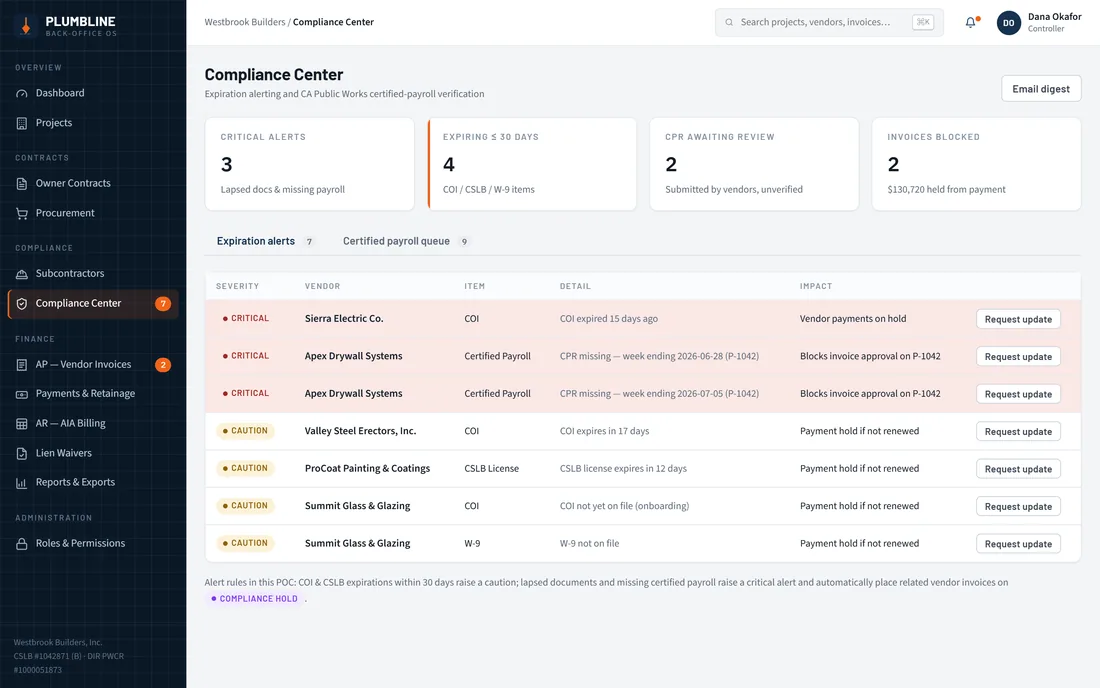
| Insurance and licence expiry | Noticed when someone looks | Dated alerts raised against the vendor record |
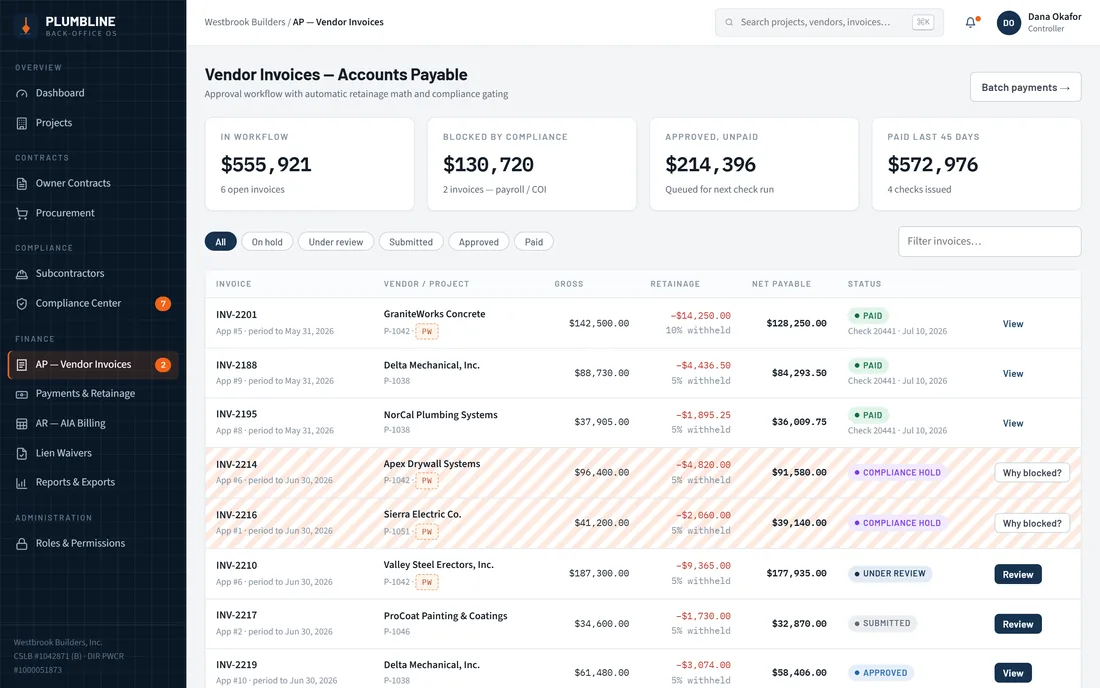
| Retainage balance | A column that drifts out of sync | Per-invoice rate with a running held balance |
| AIA payment application | Rebuilt by hand each cycle | G702/G703 generated from the schedule of values |
| Lien waiver status | A folder of scanned PDFs | Tracked against every payment, with chase workflows |
| Owner review | PDF attached to an email thread | Certified in the owner portal, with the numbers behind it |
What can you actually click?
Seven screens carry the platform, and the path between them is the point: a blocked invoice travels all the way to a cleared batch payment without anyone leaving the system.
Module A - Granular RBAC
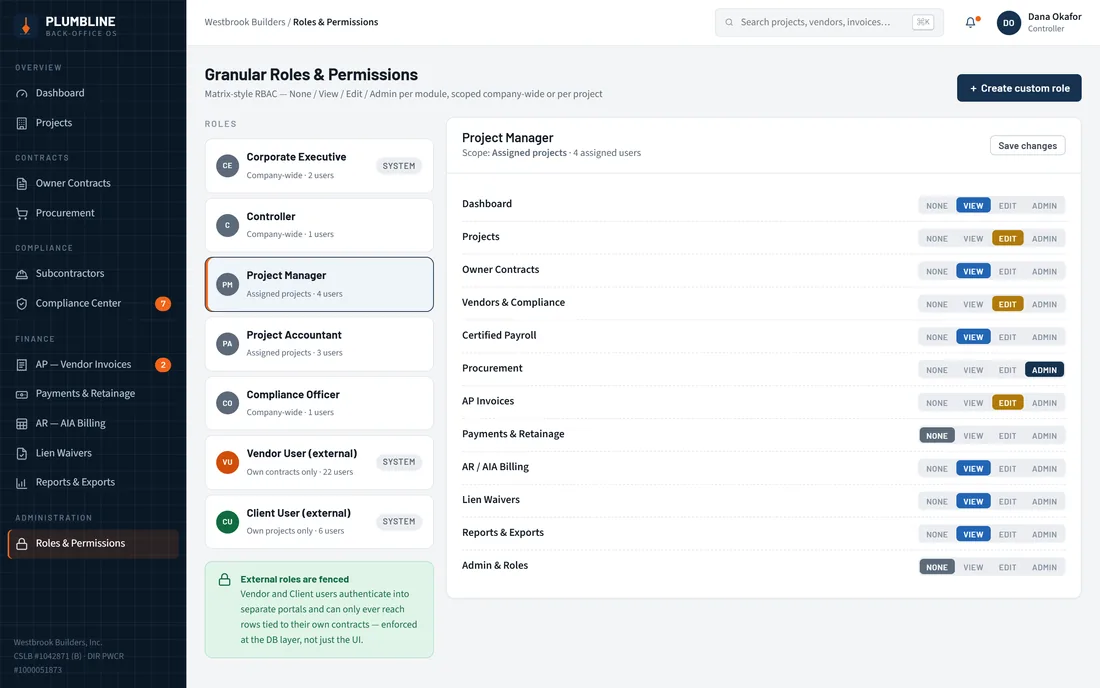
PermissionsA permission matrix of None / View / Edit / Admin per module, applied company-wide or scoped to a single project, with external roles fenced off from internal data.
- Role matrix
- Project scoping
- Fenced external roles
Module B - External portals
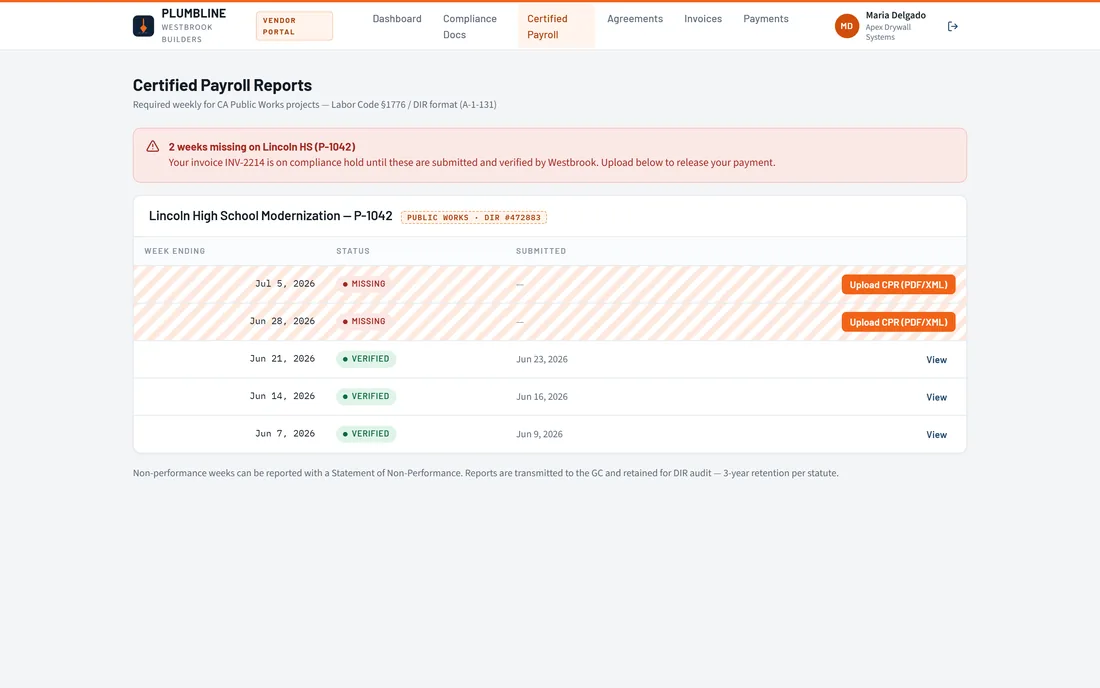
2 portalsA vendor portal for documents, payroll, SOV invoicing and payment status; an owner portal for AIA review and project financials.
- Vendor
- Owner
Module C - CA public works compliance
The gateCOI and CSLB expiry alerting, certified payroll verification that hard-blocks invoice approval, and MSA/SPA e-signature.
- COI / CSLB
- Certified payroll
- MSA / SPA signature
Module D - Procurement & AP
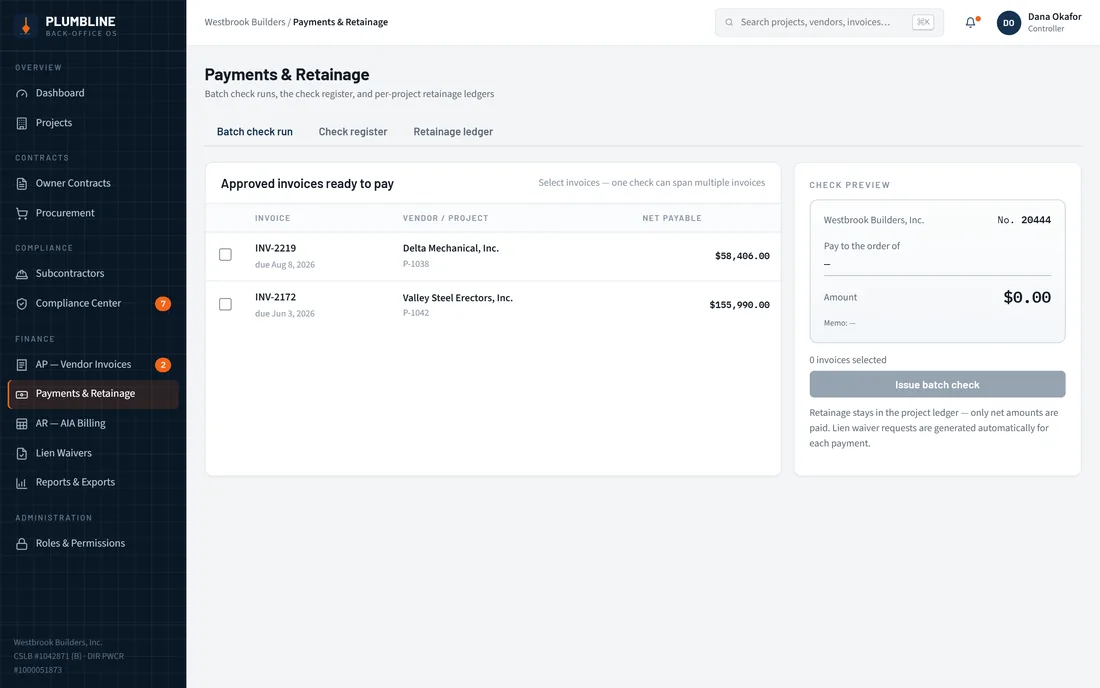
3 flowsPurchase orders, vendor change orders and T&M tags; custom retainage per invoice with running balances; and batch check runs spanning multiple invoices and vendors.
- POs and VCOs
- Custom retainage
- Batch checks
- T&M tags
Module E - Client contracts & AR
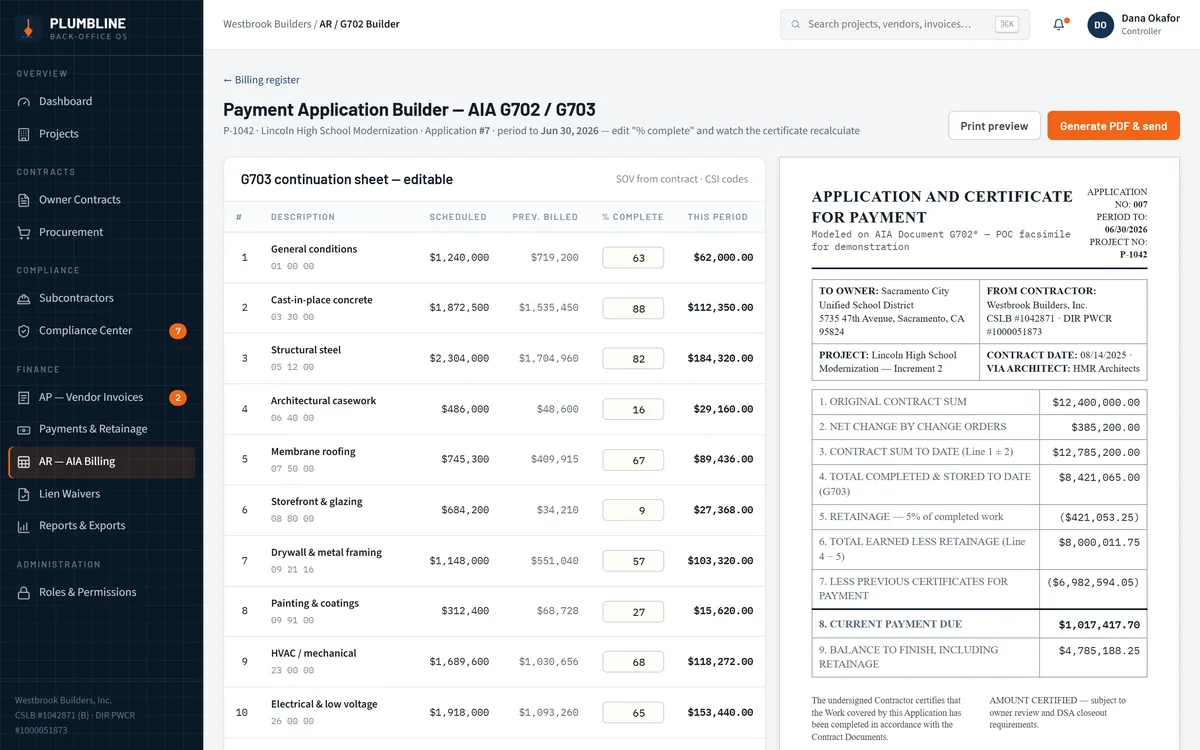
3 contract typesHard Bid, JOC and T&M prime contracts, automated G702/G703 maths and PDF, aging buckets and CSV export.
- Prime contracts
- G702 / G703
- Aging + CSV
Module F - Lien waiver tracking
4 waiver typesConditional and unconditional progress and final waivers tracked automatically against every payment, with chase workflows for what is outstanding.
- CPP / UCPP
- CFP / UCFP
- Chase workflow
How did we build it?
The brief was a written scope. The work was turning it into something a controller could click through and argue with — so the rules that gate money were built and tested before anything cosmetic.
How does a blocked invoice become a certified payment?
The path below is the whole argument for the platform: the document that is missing is the thing that stops the money, and the person who can supply it is the one asked for it.
- 01
Invoice arrives
A subcontractor bills against their schedule of values from the vendor portal.
Subcontractor - 02
Compliance blocks it
Certified payroll weeks are missing, so approval is hard-blocked and labelled with the reason.
System - 03
Vendor clears the hold
The sub uploads the missing CPR weeks in their own portal and the hold releases.
Subcontractor - 04
Controller approves
The invoice returns to the AP queue, now unblocked, with retainage applied at its own rate.
Controller - 05
Batch check run
Approved invoices across several vendors are paid in one run, retainage withheld.
Controller - 06
Owner certifies
The G702 application is reviewed and certified in the owner portal, with the maths behind it visible.
Owner
Scroll the path sideways
What does any construction back-office platform need?
Six things separate software a contractor's back office will actually live in from software it will quietly abandon. They came out of building this platform, and they hold well beyond it.
- Compliance that can say no. If the system cannot refuse to pay, the obligation falls back on a person remembering - and eventually they will not.
- Retainage as a balance, not a field. Withheld money is released years later, so it has to reconcile across the whole life of a contract.
- External parties with their own front door. Subs and owners need to upload, bill and certify without seeing each other or anything else.
- Billing generated from the schedule of values. Anything re-keyed each cycle drifts, and on an AIA certificate that drift is contractual.
- Permissions scoped to a project, not just a role. The same person is an admin on one job and a viewer on the next.
- Documents attached to the rule they satisfy. A waiver or a payroll week is only useful if the system knows which payment it unblocks.
What does the interface look like, and why?
Steel navy carries the structure, and a single safety orange is reserved for the bob in the logo, primary actions and live alerts - so it always means "act on this". The one deliberate exception is a violet hazard treatment for compliance holds, so a blocked invoice can never be mistaken for a merely overdue one.
Aa
Primary typeface
Barlow
A B C D E F G H I J K L M N O P Q R S T U V W X Y Z
a b c d e f g h i j k l m n o p q r s t u v w x y z
0 1 2 3 4 5 6 7 8 9 & ? ! £ $ €
34pxCertificate for PaymentH124pxSection headingH220pxCard headingH316pxLead copy and table headersLead14pxBody text, table cells and form fieldsBody12pxSCHEDULE OF VALUES · CSI MASTERFORMATEyebrowColour and type are the platform's own published design system rather than values sampled off a screenshot. Financial figures are set in a monospaced face with tabular figures so columns of money line up on the decimal — the detail that makes an aging report readable at a glance. Barlow, Source Sans 3 and IBM Plex Mono are open-licence typefaces; the specimen above falls back to the nearest available face if they are not installed on your device.
What is it built with?
The application stack behind the platform — the same one we take into a build of this shape.
Building a construction back-office platform
The questions contractors ask us first, answered plainly.
Ask us yoursHow long does it take to build a construction ERP?
A scope at roughly this size — six modules, three user surfaces, compliance gating and AIA billing — is a several-month programme rather than a few weeks. What moves the date most is not module count but how many statutory rules must be enforced in software and how many existing systems the data has to reconcile with. We phase it so the back office ships before the external portals.
How much does a construction back-office platform cost?
It depends on scope, and the honest answer is that nobody can quote it from a feature list alone. The biggest cost drivers are the number of separate user roles, whether payments and lien waivers are in scope, and how much accounting integration is required. Shanti Infosoft scopes it on a short call and returns a fixed quote within 48 hours.
Can it handle California public works compliance?
That is exactly what Plumbline does. Certified payroll verification, COI and CSLB expiry tracking, and MSA/SPA e-signature are treated as gates on payment rather than as reports, so an invoice cannot be approved while a required document is missing or expired.
Does it replace our accounting system?
Usually not, and we would not recommend it. A platform like this owns contracts, compliance, retainage and billing, then hands clean, reconciled figures to the accounting system you already use. Replacing an accounting package is a separate decision with its own risk.
Related work
Have a back office that lives in spreadsheets?
Tell us how your business actually works and we will tell you honestly what it takes to build. See more of our work or what we do.
Book a 15-minute call